Avoiding the Next Supply Chain Disaster with GitHub and Gradle

Table of Contents
- Why dependency monitoring is harder than it looks
- Step 1: Turn on GitHub’s Dependency Graph
- Step 2: Monitor your dependencies for vulnerabilities
- Step 3: Let Dependabot help with the easy fixes
- Step 4: Use Build Scan data to understand why a vulnerable version was chosen
- Scale this beyond a single repository with Develocity
- Conclusion
Introduction
Supply chain security is a big deal, and it’s dangerously easy to ignore. For Android or JVM developers, the sheer scale of the ecosystem is our greatest strength, and our greatest risk.
When you build an application, you aren’t just responsible for your own code; you’re responsible for a massive, invisible tree of dependencies. This presents two distinct security challenges:
- Dependency Drift: Resolved dependencies can appear, disappear, or change versions without you ever touching your
build.gradle.(kts)file. A bad actor can slip a malicious artifact into your dependency graph unnoticed. - Vulnerability Exposure: Even locking your dependencies to avoid unexpected changes doesn’t absolve you from monitoring their state. A library you’ve used for years might have a critical vulnerability (CVE) discovered tomorrow.
We’ve recently seen this play out in the wild with attacks like the Shai-Hulud npm supply-chain exploit, where attackers poisoned popular packages to execute arbitrary code downstream, and the critical Log4Shell vulnerability, which demonstrated the catastrophic risk posed by an exploit in a foundational Java logging library. We recently outlined our defense against supply chain attacks in our deep dives on continuous GRC and our Nx vulnerability response.
The good news: if your Gradle projects live on GitHub, you already have everything you need to minimize your known vulnerability count, without manually auditing resolved dependencies all day.
In this post, we’ll walk through how GitHub and Gradle work together to:
- Give you a complete, accurate view of your resolved dependencies
- Continuously monitor those dependencies for vulnerabilities
- Automatically propose and validate fixes
- Use our free Build Scan® service to understand what changed and why
Why dependency monitoring is harder than it looks #
Unlike more traditional build tools like Maven, which rely on relatively static dependency declarations, Gradle is a dynamic, highly programmable build engine. While this power is a massive advantage for developers and build engineers, it also means there’s often a significant difference between the handful of dependencies you explicitly declare in your build.gradle(.kts) and the actual set of libraries your application requires.
Let’s take a look at an example build.gradle.kts file:
plugins {
    application
}

repositories {
    mavenCentral()
}

configurations.configureEach {
    resolutionStrategy.eachDependency {
        // Global rule, forcing a minimum version
        if (requested.group == "com.fasterxml.jackson.core" && requested.module.name == "jackson-databind") {
            useVersion("2.15.2")
        }
    }
}

dependencies {
    // Contains a vulnerable transitive dependency
    implementation("commons-httpclient:commons-httpclient:3.1")

    implementation("org.slf4j:slf4j-api:2.0.12")

    // A vulnerable direct dependency
    runtimeOnly("ch.qos.logback:logback-classic:1.4.14")

    // A vulnerable direct dependency
    constraints {
        testImplementation("org.assertj:assertj-core:3.24.2") {
            because("We strictly require AssertJ 3.24.2 for new assert methods.")
        }
    }

    testImplementation("org.junit.jupiter:junit-jupiter:5.8.1")
    testRuntimeOnly("org.junit.platform:junit-platform-launcher")
    testImplementation("org.assertj:assertj-core")
}
Can you tell from this file which versions of libraries and plugins will end up in your build? What about all the transitives?
If we resolve the dependencies for the runtimeClasspath or the testRuntimeClasspath in our build (from the build.gradle.kts file above), we can see our project uses many libraries:
$ ./gradlew :app:dependencies --configuration runtimeClasspath
runtimeClasspath - Runtime classpath of source set 'main'.
+--- org.apache.httpcomponents:httpclient:4.5.13
|    +--- org.apache.httpcomponents:httpcore:4.4.13
|    +--- commons-logging:commons-logging:1.2
|    \--- commons-codec:commons-codec:1.11
+--- org.slf4j:slf4j-api:2.0.12
\--- ch.qos.logback:logback-classic:1.4.14
     +--- ch.qos.logback:logback-core:1.4.14
     \--- org.slf4j:slf4j-api:2.0.7 -> 2.0.12
$ ./gradlew :app:dependencies --configuration testRuntimeClasspath
testRuntimeClasspath - Runtime classpath of source set 'test'.
+--- org.apache.httpcomponents:httpclient:4.5.13
|    +--- org.apache.httpcomponents:httpcore:4.4.13
|    +--- commons-logging:commons-logging:1.2
|    \--- commons-codec:commons-codec:1.11
+--- org.slf4j:slf4j-api:2.0.12
+--- ch.qos.logback:logback-classic:1.4.14
|    +--- ch.qos.logback:logback-core:1.4.14
|    \--- org.slf4j:slf4j-api:2.0.7 -> 2.0.12
+--- org.junit.jupiter:junit-jupiter:5.8.1
|    +--- org.junit:junit-bom:5.8.1
|    |    +--- ...
|    +--- org.junit.jupiter:junit-jupiter-api:5.8.1
|    |    +--- org.junit:junit-bom:5.8.1 (*)
|    |    +--- org.opentest4j:opentest4j:1.2.0
|    |    \--- org.junit.platform:junit-platform-commons:1.8.1
|    |         \--- org.junit:junit-bom:5.8.1 (*)
|    +--- org.junit.jupiter:junit-jupiter-params:5.8.1
|    |    +--- org.junit:junit-bom:5.8.1 (*)
|    |    \--- org.junit.jupiter:junit-jupiter-api:5.8.1 (*)
|    \--- org.junit.jupiter:junit-jupiter-engine:5.8.1
|         +--- org.junit:junit-bom:5.8.1 (*)
|         +--- org.junit.platform:junit-platform-engine:1.8.1
|         |    +--- org.junit:junit-bom:5.8.1 (*)
|         |    +--- org.opentest4j:opentest4j:1.2.0
|         |    \--- org.junit.platform:junit-platform-commons:1.8.1 (*)
|         \--- org.junit.jupiter:junit-jupiter-api:5.8.1 (*)
+--- org.assertj:assertj-core -> 3.24.2
|    \--- net.bytebuddy:byte-buddy:1.12.21
+--- org.assertj:assertj-core:3.24.2 (c)
\--- org.junit.platform:junit-platform-launcher -> 1.8.1
     +--- org.junit:junit-bom:5.8.1 (*)
     \--- org.junit.platform:junit-platform-engine:1.8.1 (*)
Now, which one of these is vulnerable or compromised?
It turns out (according to the CVE Program), more than one:
| Component | Direct or Transitive? | Version | Vulnerability | Severity |
|---|---|---|---|---|
| ch.qos.logback:logback-classic | Direct | 1.4.14 | CVE-2026-1225 CVE-2025-11226 CVE-2024-12801 CVE-2024-12798 |
High |
| commons-codec:commons-codec | Transitive | 1.11 | CVE-2025-48924 CVE-2020-15250 |
Medium |
| org.assertj:assertj-core | Direct | 3.22.4 | CVE-2026-24400 CVE-2025-48924 CVE-2025-41249 CVE-2024-47554 CVE-2023-2976 CVE-2020-8908 |
High |
Resolving dependencies is a complex operation, and your build is doing more work than you might realize:
- Transitive dependencies bring in vulnerabilities you never declared. Say you add
spring-web, but it silently pulls in 20+ libraries, any of which could have CVEs. - Exclusions can mask problems. Someone excludes
log4j-coreto avoid conflicts, but now your app has no logging implementation and fails in production. - Constraints create false confidence. You pin
jacksonto 2.15.2, thinking you’re safe, but another dependency forces it down to 2.12.3 and wins the version conflict. - Substitution rules swap dependencies invisibly. An organizational init script replaces
httpclientwith an internal fork. Did that fork get the latest security patches?
And here’s the real problem: this logic is scattered everywhere. Your build file is just the starting point. There’s also:
- Version catalogs defining your dependency versions
- Convention plugins in
buildSrc/orbuild-logic/ - Platform projects that enforce dependency constraints
- Settings plugins that configure repositories
- Init scripts in your
~/.gradle/directory - Corporate plugins applied from internal repositories
Gradle’s dependency resolution engine looks at all of that and decides:
- Which modules to use
- Which versions to pick
- How to reconcile conflicts
Then, Gradle produces your final dependency graph. Even experienced developers struggle to mentally trace through this process.
There is no single static “list of dependencies” you can audit. The only thing that truly knows your resolved dependency graph is Gradle after it finishes the dependency resolution process.
This complexity makes manual audits hard to perform, potentially allowing vulnerabilities to slip through.
Luckily, GitHub provides a solution that automates audits.
Step 1: Turn on GitHub’s Dependency Graph #
GitHub has a powerful feature called Dependency Graph Insights, an API you can use to send your full dependency list to GitHub. Then once it has that list:
- It maintains an up-to-date view of your known dependencies.
- It surfaces known vulnerabilities with CVEs and severity.
- It can power Dependabot alerts and Dependabot security updates.
If your Gradle project repository is on GitHub, start here:
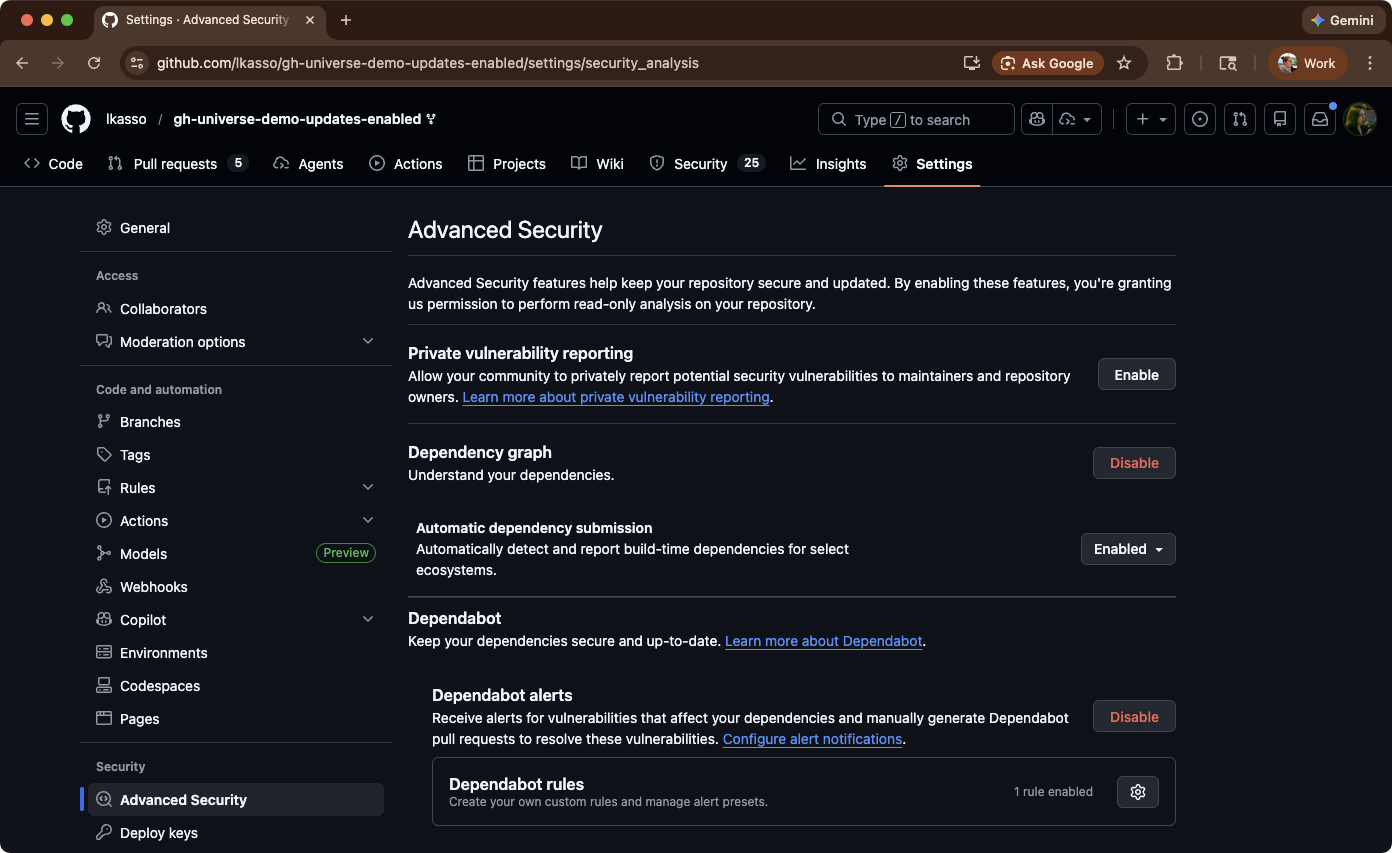
- Go to Settings → Security → Dependency graph
- Enable:
- Dependency Graph
- Automatic Dependency Submission
- Dependabot Alerts
Step 2: Monitor your dependencies for vulnerabilities #
The Dependency Graph allows you to submit dependencies via an API for GitHub to analyze. To simplify this, you can enable Automatic Dependency Submission, which automatically sends resolved dependencies from your Gradle builds to GitHub without manual API calls. Once active, Dependabot Alerts monitor these dependencies against GitHub’s vulnerability database and notify you of any security issues.
By enabling these features, you authorize GitHub to receive and analyze dependency data directly from your Gradle builds, which you can then neatly see on the Insights → Dependency graph page:
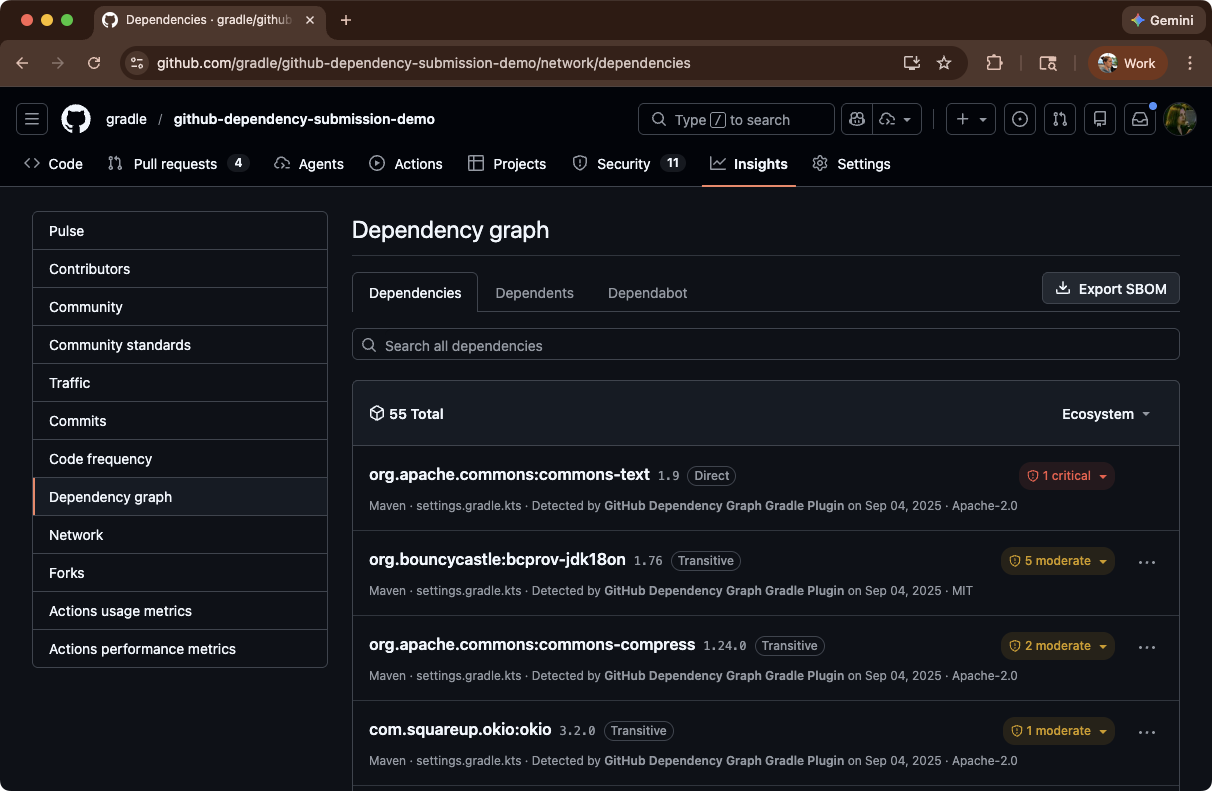
The key here is the Automatic Dependency Submission, powered by the official Gradle Dependency Submission Action.
So how does GitHub learn about your Gradle dependencies?
Under the hood, this is just a GitHub Actions workflow that:
- Checks out your repo
- Runs Gradle in a special “dependencies-only” mode using a dedicated plugin
- Submits the resolved dependency graph (including transitives) to GitHub’s API
Best yet, you don’t have to code this workflow manually if you don’t want to. When you enable Automatic dependency submission in the GitHub UI, GitHub provisions this workflow for you behind the scenes.
Then, once this Action runs, GitHub has:
- The exact set of modules Gradle resolved
- The exact versions
- And the full dependency graph across configurations
No custom parsing, no “best effort” SCA, no guessing.
If you want more control, simply add a new workflow file to your repository (eg .github/workflows/dependency-submission.yml). A sample workflow looks like this:
name: Gradle dependency submission

on:
  push:
    branches: [ main ]
  workflow_dispatch:

jobs:
  dependency-submission:
    runs-on: ubuntu-latest
    steps:
      - uses: actions/checkout@v4

      - name: Generate and submit dependency graph
        uses: gradle/actions/dependency-submission@v4
After the initial setup, simply review your Dependency Graph during codebase updates to stay informed of any new vulnerabilities.
Step 3: Let Dependabot help with the easy fixes #
Once GitHub has your resolved dependency graph, two features become incredibly valuable:
- Dependabot alerts – highlight vulnerable dependencies and link to advisories
- Dependabot security updates – automatically open PRs to bump vulnerable dependencies
For direct dependencies (the ones actually declared in your build scripts), this can be almost magical:
- You turn on Dependabot security updates for the repo.
- GitHub opens a PR updating a vulnerable dependency to the minimum safe version.
- The PR includes a clear explanation of the vulnerability that’s being addressed.
- Your CI (Gradle, tests, etc.) runs on the PR.
- You review, merge, and you’re done.
That’s already a huge win: you get a steady stream of small, targeted PRs tightening your dependency posture over time.
But there are still two cases where Dependabot cannot suggest fixes:
- Transitive vulnerabilities: A vulnerable library is pulled in via another library. It’s not declared anywhere in your build scripts.
- Complex resolution scenarios: Constraints, exclusions, and substitutions make it unclear why a given version was chosen.
That’s where Build Scan® (powered by Develocity) comes in.
Step 4: Use Build Scan data to understand why a vulnerable version was chosen #
Sometimes Dependabot will log something like:
Dependabot encountered an error performing the update.
Or it will tell you that it can’t directly update a transitive dependency, because there’s no obvious place to change it in the build.
In those cases, you need to answer questions like:
- Which direct dependency brought this vulnerable library in?
- Why did Gradle pick version X instead of Y?
- What will happen if we upgrade or exclude it?
The best tool for that is a Build Scan. A Build Scan is a detailed, shareable report of what happened during a Gradle build.
You configure your dependency-submission workflow to also publish a Build Scan:
    - name: Generate and submit dependency graph
      uses: gradle/actions/dependency-submission@v4
      with:
        build-scan-publish: true
        build-scan-terms-of-use-url: "https://gradle.com/help/legal-terms-of-use"
        build-scan-terms-of-use-agree: "yes"
Now you can:
- Open the scan for the run where Dependabot failed
- Go to the Dependencies tab
- Search for the vulnerable module
- Inspect the dependency path and selection reason
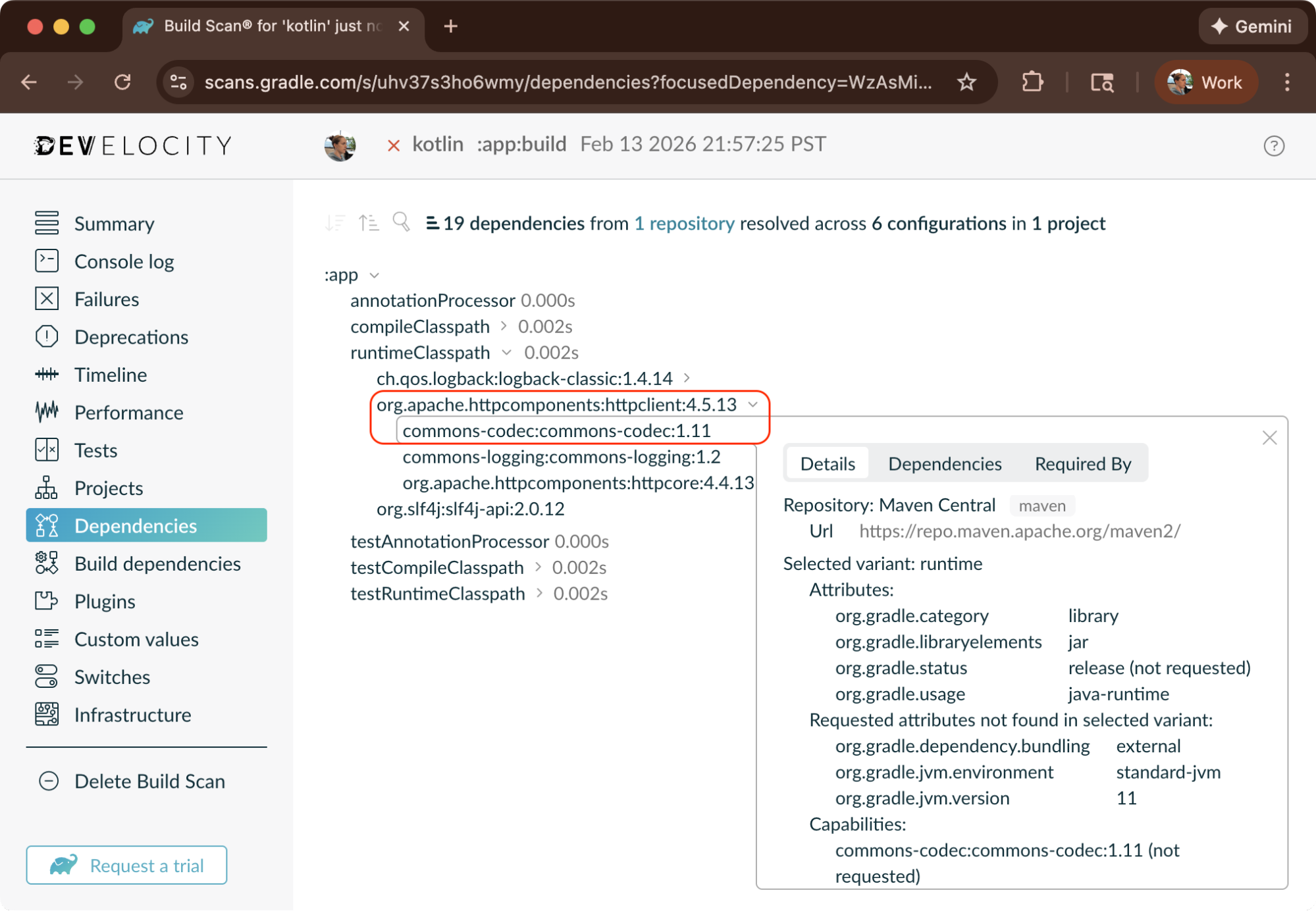
For example, you might discover that a vulnerable version of bouncycastle is coming from a storage client you added months ago. Or that a “safe” direct dependency on commons-text is being silently upgraded to a vulnerable version via a transitive dependency from another library.
Armed with this information, you can easily update your build logic to remedy any vulnerabilities.
Scale this beyond a single repository with Develocity #
Build Scan data is fantastic for debugging a single project. But when a critical vulnerability hits—like Log4Shell or the recent npm supply chain attacks—you need to answer organization-wide questions, such as:
- Which repos are still resolving log4j-core < 2.17.1?
- Is the vulnerable dependency running on local developer machines?
- How did it get there—direct or transitive?
This is where Develocity becomes essential.
When Log4Shell was announced, platform teams needed to assess exposure across hundreds of repositories in minutes, not days.
With Develocity’s Dependencies dashboard, they could:
- Filter organization-wide:
org.apache.logging.log4j:log4j-corewith version < 2.17.0 - See the full picture: Which projects? Which builds? CI and local environments?
- Trace the origin: Click through to a Build Scan to find that
log4j-api:2.3was pulled in transitively byhtmlSanityCheck:1.1.6
The fix? Update one plugin version. Time to assessment: minutes instead of days.
Develocity captures what traditional security tools miss:
- Local developer machines – Not just CI pipelines, but every build everywhere
- Historical data – “Were we ever vulnerable?” matters for incident response
- Actual resolved dependencies – No guessing from build files; Develocity reports what Gradle actually uses
This is just the beginning. If you need to prove compliance with supply chain security frameworks like SLSA, Develocity Provenance Governor generates cryptographically signed build provenance and verifies that artifacts are only promoted if they meet your security policies.
Conclusion #
Modern software is built on other people’s code, and increasingly often AI-generated code, making it hard to manually audit dependencies. That’s not going to change.
What you can change is your response. You can keep your head in the sand, or you can proactively monitor your dependencies for vulnerabilities.
If your Gradle projects are on GitHub, enable Dependency Graph Submission and Dependabot Alerts. Your builds already know what you depend on. Now GitHub can too, and it will tell you when something is broken.
If updating your Gradle distribution is a challenge, our Security Subscription can make sure you get security fixes even on an older version.