Detecting Maven-Hijack-style risks in Gradle builds with the Dependency Analysis Gradle Plugin

Table of Contents
Introduction
JVM builds have lived with “duplicate classes on the classpath” for years. Most of the time, it’s an annoying source of NoSuchMethodError or a “why did production suddenly break when I reordered dependencies?” kind of bug.
A recent academic paper, Maven-Hijack: Software Supply Chain Attack Exploiting Packaging Order, shows that this isn’t just a reliability problem, it’s also a supply-chain security problem.
DAGP 3.5.0 (Dependency Analysis Gradle Plugin), a popular community plugin, now provides another line of defense: in addition to warning you about duplicate classes, it checks binary compatibility when it finds them. That means it can spot cases where “the same class name” actually refers to different bytecode, which is exactly the kind of ambiguity Maven-Hijack exploits.
We’ll explore how to use DAGP to protect against Maven-Hijack style attacks in Gradle builds.
If you’ve heard about supply chain vulnerabilities in the npm / Nx ecosystem, we’ve also written about how Continuous GRC can help block compromised packages across your org.
What Maven-Hijack actually does #
The Maven-Hijack paper describes a class of attacks that rely on two facts about the Java ecosystem:
- Maven packaging order is deterministic - When building an uber-JAR, Maven walks the dependency tree in depth-first order and packages classes in that order. Dependencies earlier in that traversal “win” when there are duplicates.
- The JVM classloader loads the first matching class on the classpath - At runtime, the Java classloader linearly scans the classpath and loads the first class whose fully-qualified name matches the one being requested.
That’s enough to build an attack:
- The attacker finds a gadget dependency, a library that contains a class they’d love to hijack (e.g., a JDBC driver or some other central integration point).
- They then compromise or control an infection dependency that appears earlier in the dependency tree and publish a new version that contains a class with the same fully qualified name as the one in the gadget dependency.
- When the project is built, Maven packages the infection dependency first, so its version of the class is written into the uber-JAR before the legitimate one. At runtime, the JVM finds and loads the malicious class first, and the attacker controls that execution path.
The authors demonstrate this on the Corona-Warn-App backend by compromising a JSON schema library (the infection dependency) and adding a fake org.postgresql.Driver. They hijack the database connection logic without changing the application code or the declared database driver dependency:
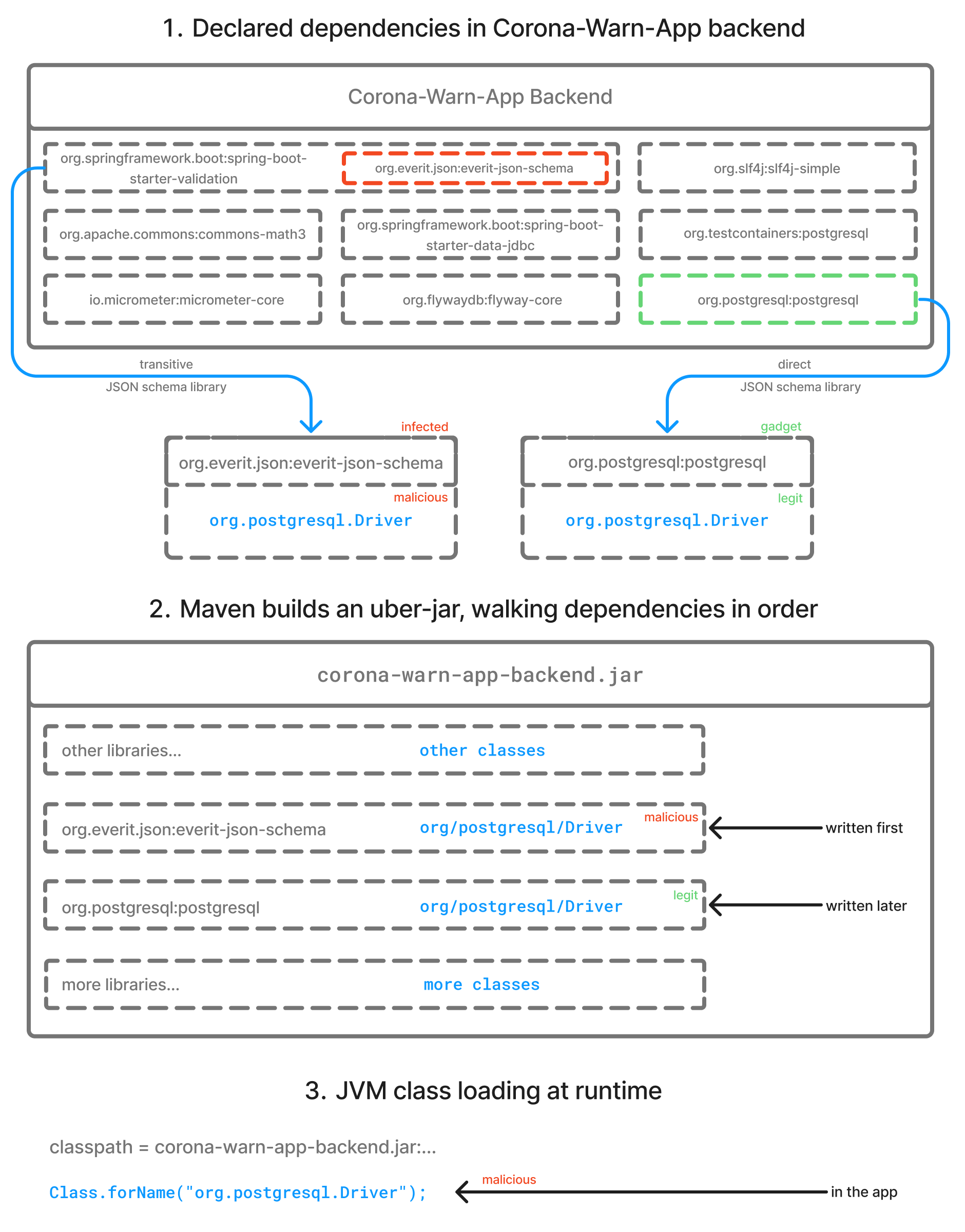
The key insight is simple but uncomfortable:
If two jars on your classpath both contain com.example.Foo (or org.postgresql.Driver in the Corona App case) then the one that “wins” is governed by build tooling behavior and classpath order, not by your intention.
The paper evaluates mitigations like sealed JARs, Java Modules, and Maven Enforcer’s banDuplicateClasses. It finds that blocking duplicate classes at build time is one of the most actionable defenses in the ecosystem today.
Duplicate classes in Gradle builds #
Gradle builds can run into similar classpath situations for a number of reasons:
- Shaded or repackaged dependencies
- Accidental inclusion of two versions of the same library
- Using
buildSrc(see issue 8301) - Generated code (e.g., protos) being produced in multiple places
- “Fat jars” or custom packaging logic
In the best case, this results in warnings or obvious runtime failures. In the worst case, it silently changes which implementation is actually used at runtime, and that can be:
- A subtle production bug
- A performance regression
- Or, in a Maven-Hijack scenario, a malicious override of a core class
The Dependency Analysis Gradle Plugin (DAGP) already helps with this by warning when a classpath contains duplicate class files.
In settings.gradle.kts:
plugins {
  id("com.autonomousapps.build-health") version "3.4.1"
}
In the root build.gradle.kts:
dependencyAnalysis {
  issues {
    all {
      onAny {
        severity("fail")
      }
    }
  }
}
In the app project build.gradle.kts:
plugins {
    application
}

group = "com.example.app"
version = "1.0.0"

application {
    mainClass.set("com.example.App")
}

dependencies {
    implementation(project(":trusty-lib"))	// Contains TrustyService class
    implementation(project(":malicious-lib"))	// Contains TrustyService class
}
Running ./gradlew buildHealth in the root project:
There were non-fatal dependency warnings.
See report at file:///build/reports/dependency-analysis/build-health-report.txt

BUILD SUCCESSFUL in 993ms
102 actionable tasks: 78 executed, 24 from cache
In build-health-report.txt:
Advice for :app
Warnings
Some of your classpaths have duplicate classes, which means the compile and runtime behavior can be sensitive to the classpath order.

Source set: main
\--- compile classpath
     \--- com/example/trusty/TrustyService is provided by multiple dependencies: [:malicious-lib, :trusty-lib]
\--- runtime classpath
     \--- com/example/trusty/TrustyService is provided by multiple dependencies: [:malicious-lib, :trusty-lib]
The report will:
- Report unused dependencies
- Flag mis-configured configurations (
apivsimplementation, etc.) - Warn when a classpath has duplicate class files
Historically, DAGP didn’t know whether those duplicates were identical or not.
In some codebases, it’s common to see many proto-generated classes with the same names but slightly different binary signatures because of how the protos are used. That leads to order-dependent behavior: change the order of dependencies and suddenly a different version of a class “wins”.
That’s exactly the kind of ambiguity Maven-Hijack attacks weaponize.
DAGP 3.5.0: binary compatibility for duplicate classes #
Starting in 3.5.0, DAGP adds a new capability on top of its existing duplicate-class detection:
When it finds duplicate classes on a classpath, it can check binary compatibility between those class files.
Conceptually, for each fully-qualified class name that appears in more than one jar, DAGP now asks:
- Do these class files have the same binary signature?
- Same fields (name, type, modifiers)
- Same methods (name, parameters, return type, modifiers)
- Or are they incompatible (methods missing, changed signatures, etc.)?
This gives you three useful buckets:
- No duplicates
- Class appears in exactly one location → no ambiguity.
- Identical duplicates
- Same class name, same binary signature.
- Still worth investigating (why are you shipping the same class twice?), but less dangerous from a behavior point of view.
- Incompatible duplicates
- Same class name, different binary signatures.
- This is where things get dangerous:
- Build order or classpath order decides which version of the class wins.
- Reordering dependencies or tweaking shading rules can silently change runtime behavior.
- In a supply-chain scenario, a malicious class could be slipped into one of those jars.
That third category is very close to what Maven-Hijack exploits: two jars both claim to provide the “same” class, but one of them is doing something different.
How this helps against Maven-Hijack-style attacks #
To be clear, DAGP is not a silver bullet against Maven-Hijack. An attacker could, for example, ship a malicious class that preserves the same public surface but changes implementation details in ways that look “binary compatible”. Static analysis has limits.
However, this new check plus the existing duplicate-class warning gives you a powerful early-warning system:
- You find out you have duplicate classes at all
- DAGP already reports “classpath has duplicate class files” so you can see when
com.example.Fooexists in multiple dependencies.
- DAGP already reports “classpath has duplicate class files” so you can see when
- You know whether those duplicates are suspicious
- If they are binary-incompatible, that’s a clear signal something is off:
- Misconfigured shading
- Two competing versions of a library
- Generated code out of sync
- Or, in the worst case, a potentially hijacked class
- If they are binary-incompatible, that’s a clear signal something is off:
- You reduce the attack surface
- The Maven-Hijack paper found that the most actionable defense was “fail the build when duplicate classes exist” (via Maven Enforcer).
- DAGP lets you apply a similar policy in Gradle projects:
- Fail or warn when duplicates exist
- Escalate severity when duplicates are binary-incompatible
- That doesn’t just protect against intentional attacks; it also forces you to clean up messy classpaths that are fragile by design.
Maven-Hijack is exploiting a design pattern that many builds already have. DAGP 3.5.0 gives you a way to see that pattern and treat it as a security and reliability issue, not just a “the build still passes so it must be fine” issue.
In settings.gradle(.kts):
plugins {
  id("com.autonomousapps.build-health") version "3.5.1"
}
Running ./gradlew buildHealth in the root project:
There were non-fatal dependency warnings.
See report at file:///build/reports/dependency-analysis/build-health-report.txt

BUILD FAILED in 794ms
102 actionable tasks: 78 executed, 19 from cache, 5 up-to-date
Unlike before, DAGP now not only finds duplicate classes but also fails the build, a notable change in behavior:
In build-health-report.txt:
Advice for :app
Unused dependencies which should be removed:
  implementation(project(":malicious-lib"))

Warnings
Some of your classpaths have duplicate classes, which means the compile and runtime behavior can be sensitive to the classpath order.

Source set: main
\--- compile classpath
     \--- com/example/trusty/TrustyService is provided by multiple dependencies: [:malicious-lib, :trusty-lib]
\--- runtime classpath
     \--- com/example/trusty/TrustyService is provided by multiple dependencies: [:malicious-lib, :trusty-lib]
DAGP provides a task called reason to explain why the plugin is emitting advice regarding some dependency. Running ./gradlew :app:reason --id :malicious-lib:
------------------------------------------------------------
You asked about the dependency ':malicious-lib'.
You have been advised to remove this dependency from 'implementation'.
------------------------------------------------------------

Shortest path from :app to :malicious-lib for runtimeClasspath:
:app
\--- :malicious-lib

Source: main
------------
* Is binary-incompatible, and should be removed from the classpath:
  Expected METHOD com/example/trusty/TrustyService.greet(Ljava/lang/String;)Ljava/lang/String;, but was com/example/trusty/TrustyService.greet(Ljava/lang/String;)I
With DAGP 3.5.0 and the new binary-compatibility check in place, those duplicate-class reports become much more actionable: you can see which duplicates are merely redundant and which are truly suspicious.
The recommended steps:
- Decide which library should “own” the
TrustyServiceclass. - Exclude the other copy (via Gradle’s
excludemechanisms or by fixing the dependency graph). - If the duplication is coming from a shaded jar, consider:
- Applying relocation rules correctly, or
- Pushing on the upstream project to avoid leaking internal classes.
Luckily, DAGP provides a fixDependencies task, which will take the advice and automatically apply it to Kotlin build scripts.
Running ./gradlew fixDependencies:
> Task :app:fixDependencies
Fixing dependencies for /Users/lkassovic/Downloads/dagp-duplicate-demo/app/build.gradle.kts.
We can then see that in app/build.gradle.kts, the malicious-lib dependency has been removed:
dependencies {
    implementation(project(":trusty-lib"))
}
Why Gradle is safer by default than Maven #
It’s worth calling out that Gradle behaves more defensively then Maven by default.
Since Gradle 7.0, archive tasks like Jar and Zip fail the build when duplicate files are encountered inside the archive. This is controlled by the duplicatesStrategy on CopySpec, which defaults to DuplicatesStrategy.FAIL. In practice, that means if a transitive dependency tries to sneak in an extra file or any other duplicate resource, Gradle will stop the build instead of silently picking one. Maven, on the other hand, will merge all JAR contents together, which is what makes this kind of Maven-Hijack attack so easy to pull off in the first place.
What this means for your builds #
Maven-Hijack shows that “classes with the same name in two jars” is not just a sloppy build pattern, it can be a supply-chain compromise vector. While Gradle isn’t Maven and your build may not be producing uber-JARs in the same way, the underlying risk is the same: if two class files claim to be the same class, and one of them behaves differently, you’ve given the build and classpath order the power to decide which one runs.
DAGP’s duplicate-class reporting and new binary-compatibility check help you detect that situation early, so you can treat it as a bug (or a potential incident), not a surprise in production.
DAGP closes one important gap inside Gradle builds. To get the bigger picture, seeing every build, artifact, and environment as production infrastructure, check out “Your toolchain IS production”, where we show how Develocity’s provenance and observability features help secure and stabilize the whole delivery pipeline.
If updating your Gradle distribution is a challenge, our Security Subscription can make sure you get security fixes even on an older version.
If you want to learn more about the intricacies of the JVM ecosystem from the author and primary contributor to the Dependency Analysis Gradle Plugin, check out Tony Robalik’s post Is the Java ecosystem cursed? A dependency analysis perspective.