Achieving Fast Inner Dev Loops with Gradle: Configuration Cache and Beyond

Table of Contents
Introduction
How many engineers in your organization have to sit idle for 10 or more minutes just to rebuild the app locally after a small change?
If you’re an engineering leader, build engineer, or part of a developer productivity team, you’re not alone in facing this challenge. Building complex software is inherently demanding, but the time your developers spend waiting has a profound impact beyond just the literal minutes lost. It fundamentally disrupts their psychological flow.
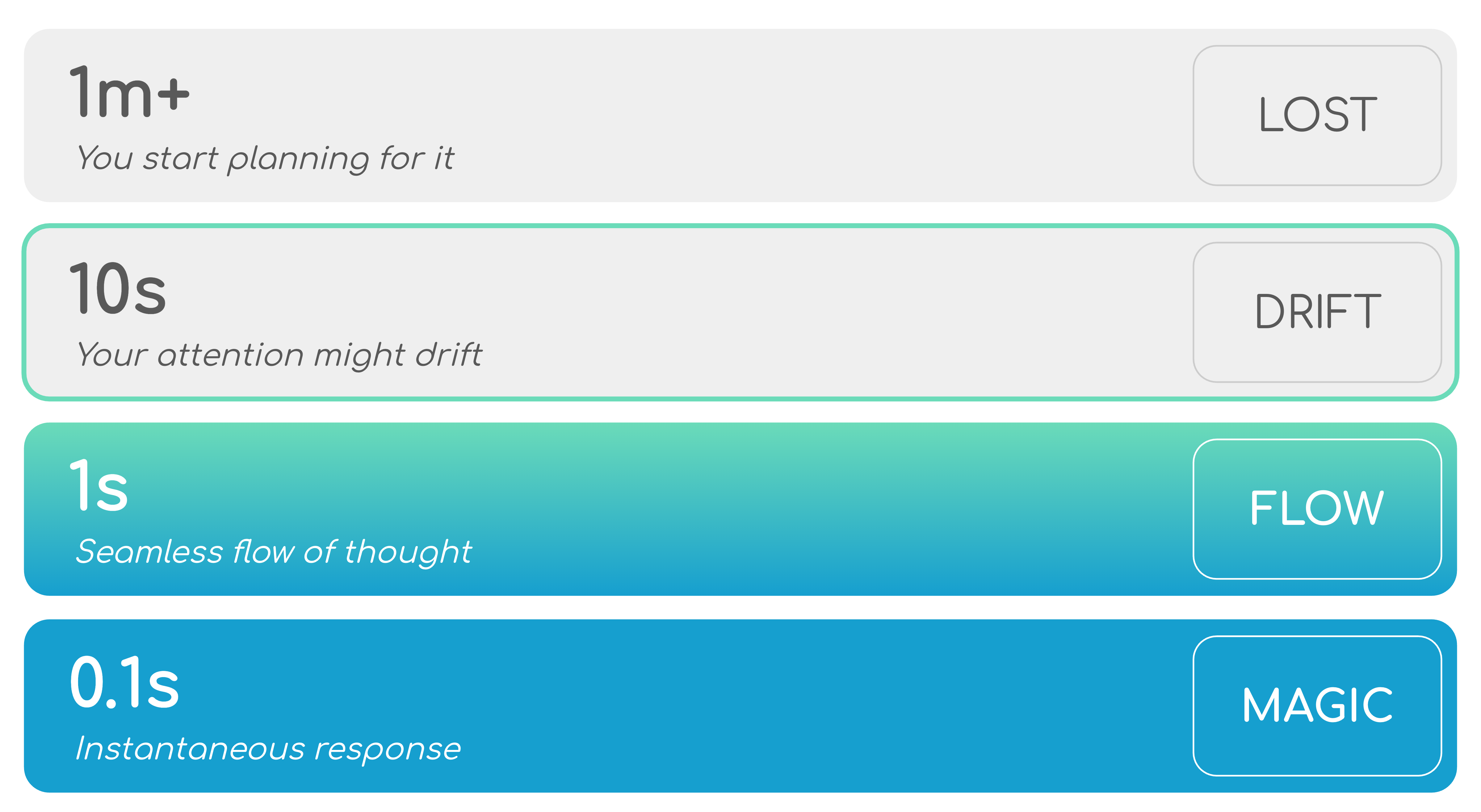
“There are like these time scales of psychological flow, right? So if something takes longer than a minute, you already start planning for it… you suffer from context switch as well. If it’s 1 second, that’s where we want to be right in that seamless state of flow. And if it’s less than one second, then you feel it’s like magic… productive developers are happy developers.” — Rodrigo Oliveira
When developers have to wait, their attention drifts, and the cost of context switching destroys their momentum. Our goal as enablers of developer productivity should be to eliminate this friction, bringing that feedback loop as close as possible to the “magical one second”.
In a recent presentation at KotlinConf 2025, Gradle engineers Rodrigo Oliveira and Alex Semin detailed how Gradle Build Tool is evolving to keep developers in that productive, happy “flow state”. By tackling the most significant bottlenecks in modern software builds, Gradle is paving the way for incredibly fast inner developer loops. If you prefer to watch the presentation recording, you can find it here.
The shifting bottleneck: From execution to configuration #
On every invocation, Gradle goes through three distinct phases: initialization, configuration, and execution. Historically, when we optimized Gradle builds, we focused almost exclusively on the execution phase. This is when the majority of work expected by a developer happens: production sources compilation, test execution, etc.
For years, execution was the longest phase. We tackled this successfully using two primary paradigms:
- Work avoidance: Skipping work that doesn’t need to be redone (e.g., incremental builds, Build Cache)
- Parallelism: Running independent tasks concurrently
These optimizations were highly successful, but as the industry evolved, codebases exploded in size. As projects grew larger, a new bottleneck has emerged: the configuration phase—the evaluation of the build logic and construction of the work graph. For some large-scale enterprise applications, the time it takes just to configure the project and build the work graph can actually exceed the time it takes to execute the tasks themselves.
The magic of the Configuration Cache #
To shrink this disproportionate overhead and get our developers back into their flow state, we can apply those same principles of work avoidance and parallelism to the configuration phase. This is exactly what Gradle’s Configuration Cache achieves.
By treating the configuration phase as a pure function that ultimately produces a work graph, Gradle can cache the entire result. The inputs to that function are the project structure and build configuration inputs like environment variables and system properties. The next time a developer runs the same command, if the inputs haven’t changed, Gradle completely skips the configuration phase, loads the cached work graph and jumps straight to execution.
The ROI of adopting the Configuration Cache at an enterprise scale is staggering.
“We’ve been working with partners across the industry… Block shared with us that they save 4 years of engineering time annually just by adopting Configuration Cache, and they were one of the really early adopters of the technology.” — Alex Semin
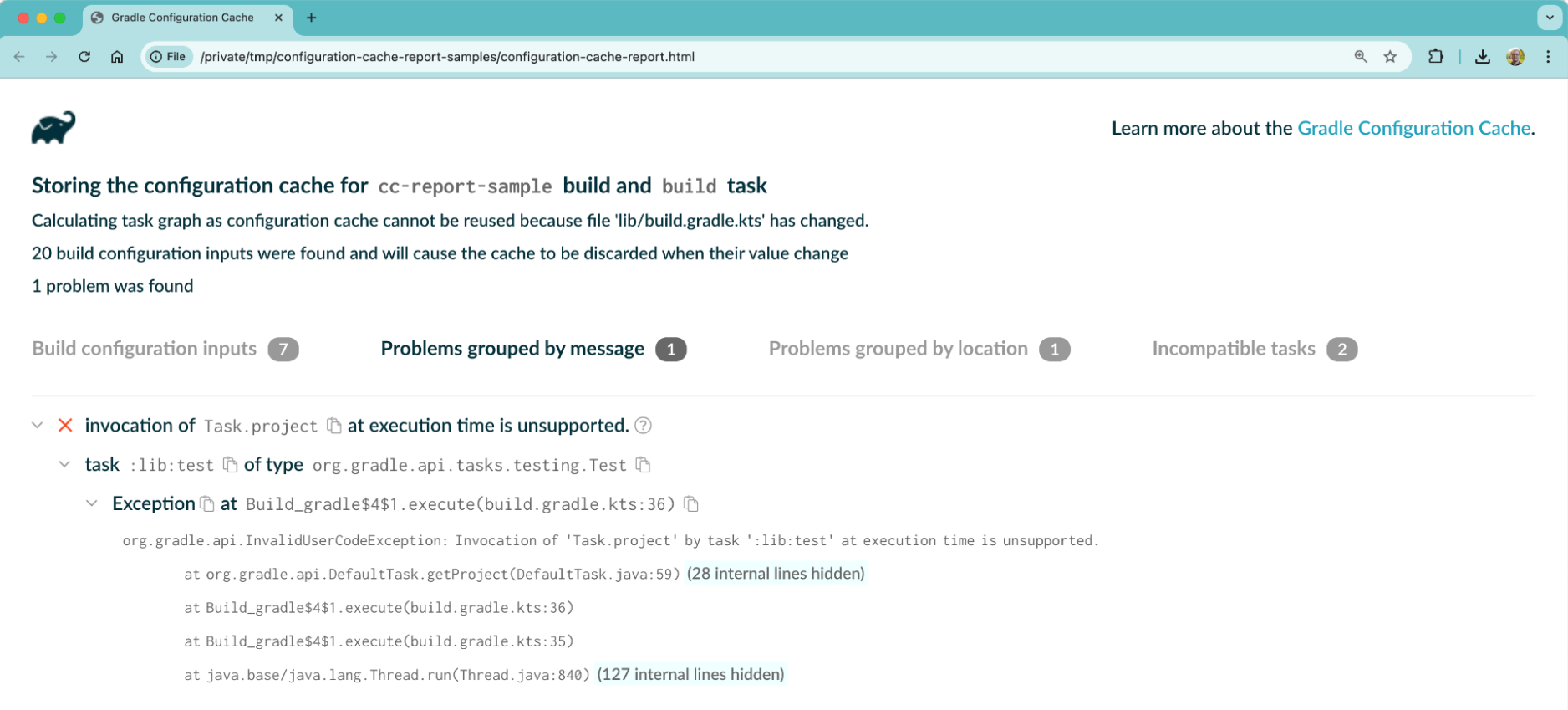
Adopting this feature is no longer a cutting-edge experiment. It has been polished over the last two years to become highly reliable, with comprehensive HTML reports that explain exactly why a cache hit was missed—such as when someone touched the build logic or modified the environment.
Furthermore, enabling Configuration Cache transparently unlocks new levels of parallelism. Gradle can now run more tasks in parallel, even if they reside within the same project, as long as they don’t depend on each other. This can be especially helpful if you have multiple test sets or variants per project, each represented by a task.
The next frontier: Isolated Projects #
While Configuration Cache is a massive leap forward, we have to look ahead at the next chapter of scalability. Configuration Cache speeds up the workflow of rerunning the same task, but run another task or change a single configuration input and you get a cache miss. For large Android apps or enterprise monorepos, the reconfiguration of thousands of subprojects on a cache miss can still greatly impact developer productivity.
This is where Isolated Projects comes in - an experimental feature that further improves performance. As the name suggests, we are putting stricter boundaries around subprojects, which allows bringing parallelism and work avoidance to project configuration. This means that even Configuration Cache misses become much faster.
Historically, Gradle offered immense flexibility, allowing projects to reach into each other’s shared mutable state during configuration. However, this flexibility comes with the cost of often-unintentional coupling between projects. This ultimately prevented Gradle from running project configuration in parallel.
“We recognize for some use cases you don’t really need that flexibility, and if we could say, here’s a tradeoff: you give us a piece of that flexibility back, but we can make things significantly faster, like next-level faster.” — Alex Semin
By adopting Isolated Projects, you guarantee that projects do not touch the mutable state of other projects. This seemingly small architectural constraint unlocks potential for great dividends:
- Parallel configuration: always run project configuration in parallel
- Partial configuration: configure only the projects needed for running the given tasks
- Project configuration caching: cache results per project and reconfigure only affected projects on a cache miss
All of the above can enable lightning-fast IDE syncs for Android Studio and IntelliJ IDEA. Historically, syncing a project in an IntelliJ-based IDE meant reconfiguring everything. With Isolated Projects, more things can be configured in parallel or can reuse configuration from previous syncs. This allows Gradle to dramatically speed up IDE sync times, removing a major source of daily developer friction.
While not all optimizations have been implemented, parallel project configuration is already available and provides tangible improvements. Android Studio sync times can be reduced significantly even for small builds in scenarios involving build logic changes. Our benchmarks show speedups from 1.3x to 2.5x for builds with 50-100 subprojects.
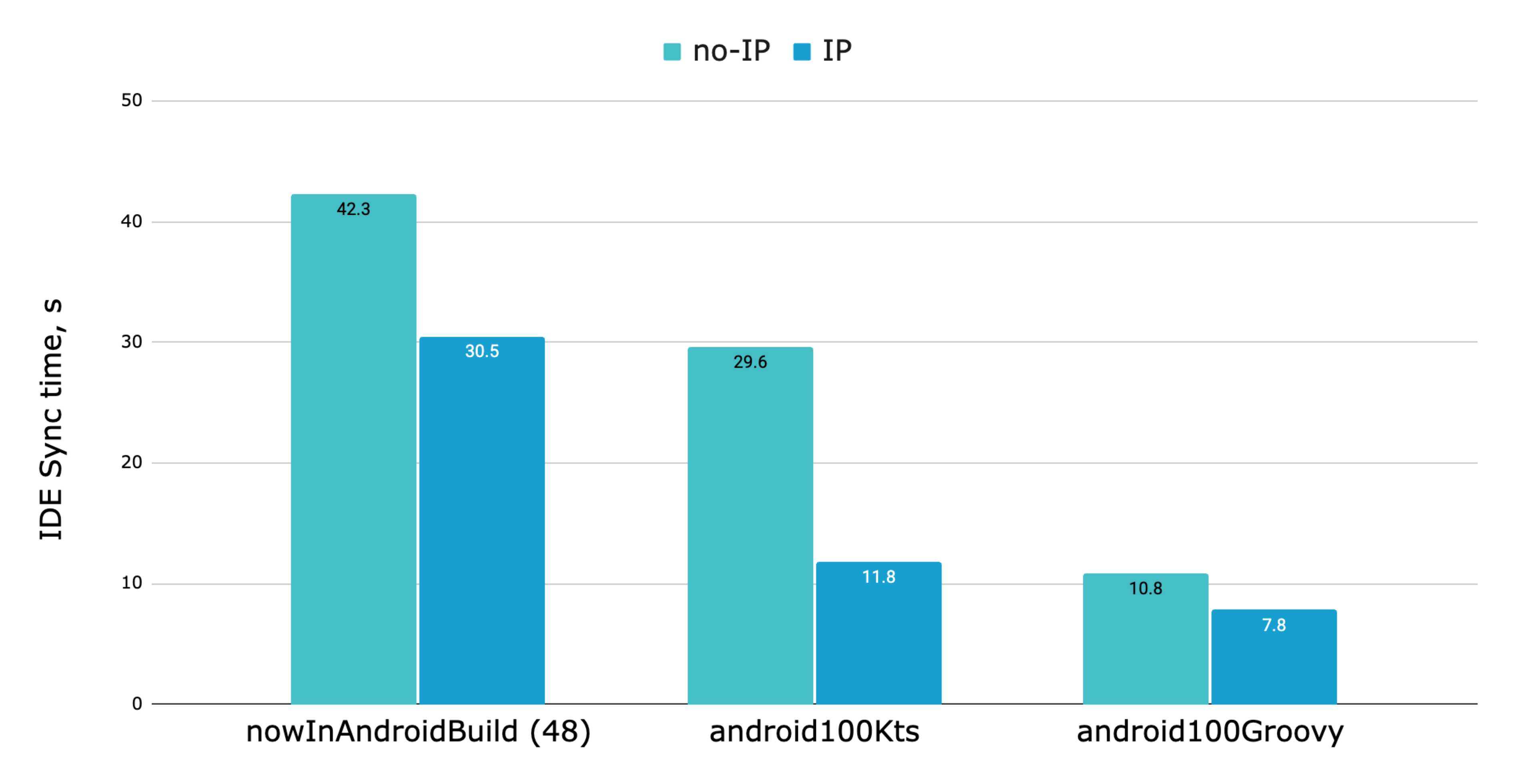
The benchmark includes the popular NowInAndroid project, which was recently made compatible with Isolated Projects. This highlights the feasibility of the migration for Android projects.
You can’t improve what you can’t observe #
Adopting Configuration Cache and preparing for Isolated Projects is fantastic, but how do you know if your organization is actually reaping the benefits? To achieve software delivery excellence, tooling alone isn’t enough—you need deep observability.
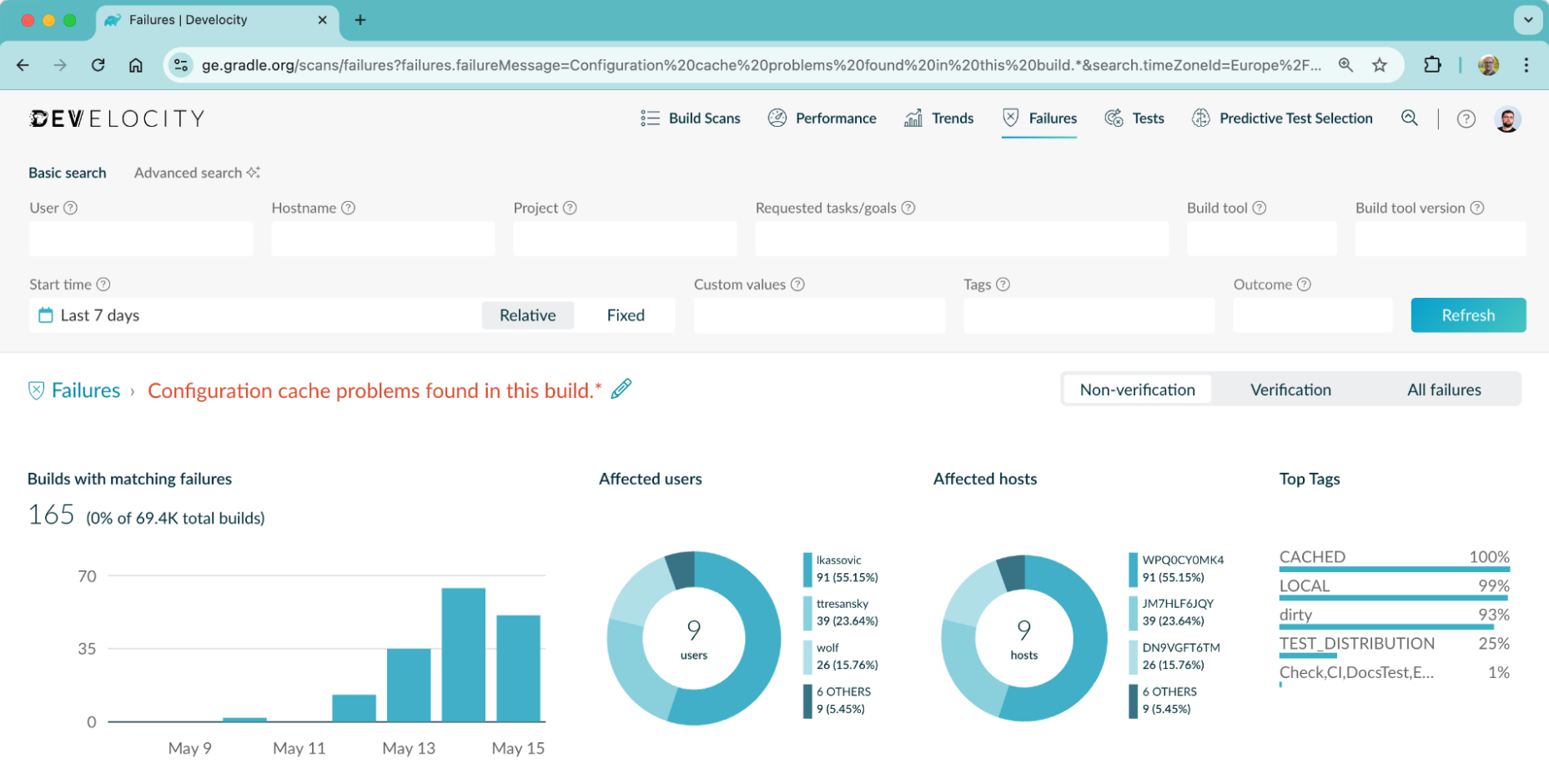
This is where integrating a platform like Develocity becomes critical for engineering leaders and productivity engineers. Develocity acts as an observability and acceleration layer across your entire software lifecycle, shifting visibility left, directly into the hands of your developers.
With Develocity, you aren’t flying blind. You can:
- Track cache performance: Use integrations with Grafana dashboards to monitor cache invalidation reasons across your entire company, tracking exactly how many cache hits you’re getting and how much time you’re saving.
- Accelerate builds: Utilize Universal Cache, Predictive Test Selection, and Test Distribution to speed up build and test cycles globally.
- Troubleshoot faster: Empower your developers with Build Scans to get granular analytic information in 30 seconds, helping them instantly debug performance issues and flaky tests.
Preparing for the future #
The ecosystem is moving fast, and as guardians of developer productivity, we must ensure our teams are not left behind. Most ecosystem plugins for Java, Kotlin, and Android are already compatible with the Configuration Cache.
The Gradle team sees Configuration Cache as the future of the build tool. In the major Gradle 9 release, Configuration Cache has become a preferred mode of execution. In the upcoming Gradle 10, Configuration Cache will go a step further and become the default.
Take these next steps today to get ready for the future:
- Dip your toes in: Have your teams run their local Gradle builds with the Configuration Cache enabled today.
- Fix incompatibilities: Review the provided HTML reports and update any custom build logic or plugins that rely on incompatible, shared-state APIs.
- Invest in observability: If you haven’t already, run a free Build Scan and explore how Develocity can give you the data you need to drive these productivity initiatives forward.
- Read the documentation: Review the updated Isolated Projects documentation as this experimental feature evolves.
By focusing on the inner dev loop, adopting Configuration Cache, preparing for Isolated Projects, and leveraging deep observability, we can give our teams the gift of flow. When developers are in the flow, they are happy—and happy developers build incredible software.
Want to learn more? #
If you’d like a more hands-on look at adopting Configuration Cache, check out the Adopting Configuration Cache — DroidCon 2026 session, that walks you through the practical steps of enabling and troubleshooting Configuration Cache in real-world projects.