How the Gradle Team Adopted Isolated Projects

Table of Contents
Introduction
Isolated Projects is an experimental feature aimed at improving Gradle scalability and performance. It speeds up builds by running project configuration in parallel, which benefits practically every workflow, from CI builds to IDE sync.
We want the feature to offer an excellent user experience, so we made it a goal to adopt Isolated Projects in our own build, even though it is still in active development. This lets us find and smooth out the rough spots early, though secretly, we were also looking forward to the productivity boost for our own team.
With Isolated Projects, more build logic runs concurrently. To keep builds reliable under that parallelism, the feature introduces additional constraints, and adopting it means migrating your build to address the violations of those constraints.
Migrating our build #
Isolated Projects builds directly on top of the Configuration Cache, so making the build Configuration Cache compatible is a prerequisite. Fortunately for us, we’ve been enjoying fast inner developer loops for many years now, so that box was already checked.
The general approach to migrating against new constraints is to start with the simplest workflows, such as running the help task, and address the violations. Then proceed to more complex workflows, such as IDE sync or CI. Running in Diagnostics mode helps you see all violations at once in a single HTML report, and the guide describes the recommended migration path.
For the Gradle build, we followed a similar path. What helped us the most and made the migration much smoother is following the best practices, especially the best practice of having convention plugins: each project applies the build logic it needs, and no project has to reach in and mutate another’s state directly.
We’ve leaned heavily on sharing artifacts between projects only via dependency management, which is inherently compatible with Isolated Projects by making each project define its “outputs”, on which other projects can depend. For more complex cases we had to use Shared Build Services, a more delicate but versatile API.
An important part of the migration is to identify early the violations that come from third-party dependencies, such as community plugins, and report them to the maintainers. Because we were adding new constraints while simultaneously adopting the feature, some incompatibilities inevitably surfaced. For instance, a few affected the Kotlin plugin, and the Kotlin team promptly fixed them in the next release.
Rolling it out across the team #
Our internal milestone was an IDE sync with zero violations. Making more workflows compatible is only one dimension of the migration, though; the other is rolling the feature out across the team and environments.
Once we had confirmed the sync was clean, volunteers on the team enabled the feature locally to assess its stability in day-to-day work. After some time had passed, we were happy to learn that practically no defects had been discovered. The only thing we found was incomplete support for Kotlin script editing, which has since been fixed.
The next step was to enable the feature flag in the repository itself, so it is automatically enabled for anyone working on Gradle. Flipping the flag itself is simple, but we weren’t ready to run all of our CI pipelines on an experimental feature. To address this, we made sure the relevant CI jobs all had the feature explicitly disabled via a command-line flag, which takes precedence over what’s specified in the checked-in gradle.properties file.
Keeping the feature enabled for at least some CI jobs, even something as small as the equivalent of the help task, matters: it lets CI validate the build against the constraints and prevents incompatible build logic from being merged upstream.
With that, the whole team got to enjoy the performance benefits in local builds and IDE sync.
Measuring the performance improvements #
In the early stages of adoption, we manually validated how fast the builds became when Isolated Projects was enabled. Since then, we’ve also matured the tooling to get those measurements reliably and reproducibly, even for complex scenarios such as IDE sync.
With recent versions of the Gradle Profiler, it’s possible to run IDE sync scenarios for IntelliJ IDEA, which is the main IDE used in the team.
Here are two IDE sync scenarios for the Gradle build itself:
- Sync after adding a dependency to a project – a common everyday change
- Sync after changing build logic – something that often happens when switching branches or rebasing
With Isolated Projects enabled, the sync became roughly 1.7× faster for the adding a dependency scenario, dropping from about 45s to 27s — a saving of around 18s. The gains grow with the amount of work a sync has to redo. Changing build logic, for instance, can force the build scripts to recompile, and there the sync is closer to 2.3× faster, going from about 2m57s down to 1m16s — a saving of around 1m41s each time.
These results were produced on a 10-core machine, while capping Gradle parallelism to 8 workers. If you want to see for yourself or reproduce these numbers, both scenarios and the instructions live in this repository.
These speedups are good, but they fall short of the 8× that perfect parallelism would suggest, and the reason is worth understanding. Isolated Projects parallelizes the configuration of projects, and configuration is only one part of what an IDE sync does. The stages of a sync depend on one another’s data, so some of them cannot begin until earlier ones finish. Those dependencies limit how much of the work can actually run at the same time, which keeps the real speedup well short of that ideal. The performance section of the user guide goes into more detail on what to expect.
Confirming the impact with Develocity #
Benchmarks are a useful tool, but a measurement done in a vacuum is hard to tie directly to real-world impact. The question we really cared about is how Isolated Projects improves the lives of our developers when they work on Gradle day to day. Because Develocity integrates deeply with Gradle and captures every build, we could answer it by looking back over months of real work.
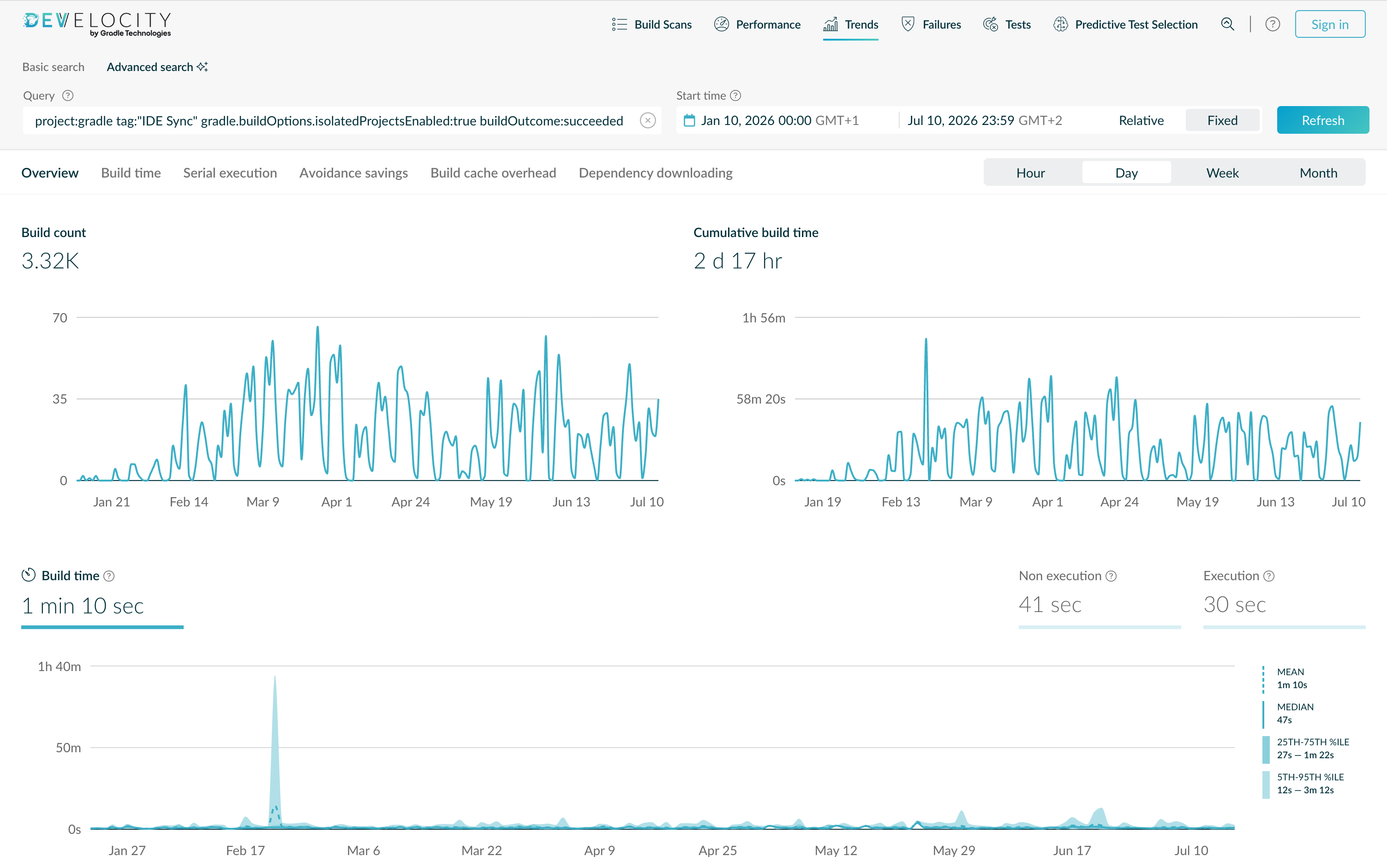
Over roughly six months, our developers ran thousands of IDE syncs, several times a day each, and the typical one roughly halved: the median dropped from about 1 minute 24 seconds without Isolated Projects to about 47 seconds with it. The improvement is not limited to the typical case, either. The slowest syncs, the ones that really break concentration, improved just as much: the 95th percentile fell from nearly 7 minutes to a little over 3.
These numbers come straight from the Trends dashboard. Using its Advanced Search, we filtered down to the builds we cared about: successful IDE syncs, split by whether Isolated Projects was enabled via the gradle.buildOptions.isolatedProjectsEnabled flag, excluding failing builds since they can be fast for the wrong reasons.
Both dashboards are public, and their links carry the full set of filters, so you can explore them yourself. The view with Isolated Projects enabled:
And the one with it disabled:
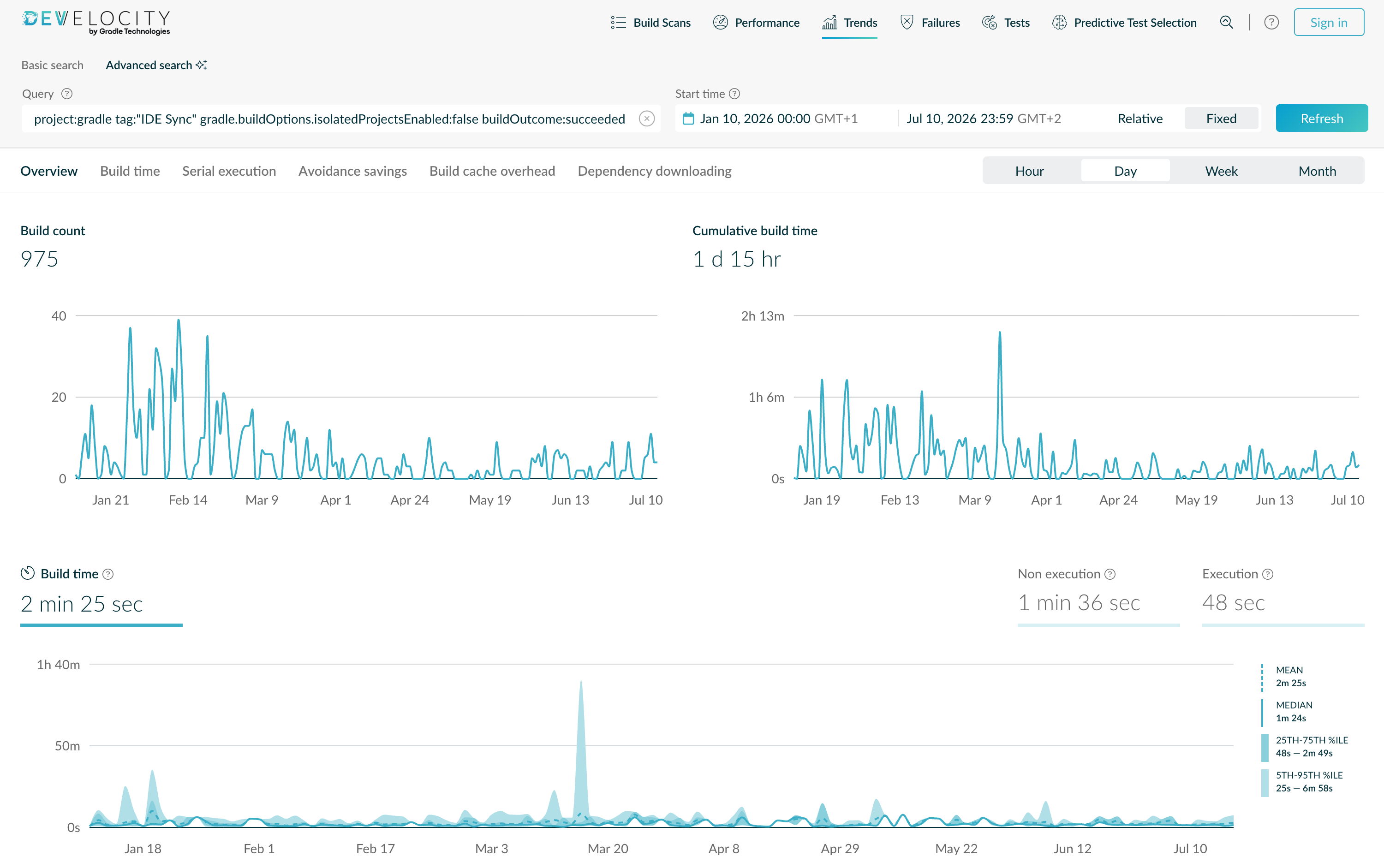
As long as you can select your IDE syncs by some criteria, any Develocity user can get the same view for their own build.
Where we are today #
For several months now, Isolated Projects has been our daily driver for all local developer workflows, and we have not looked back. Everybody on the team loves to see machine cores occupied from the very start of a build!
We are running with Isolated Projects enabled on some parts of our CI pipelines, but not all. Once the CI integrations resolve their incompatibilities, we’ll be able to proceed with that too. Until then, we are also not building production artifacts with the feature, and we’d advise doing so only after verifying that the outputs stay correct.
As for the Isolated Projects feature itself, we are actively working toward graduating it from experimental to incubating. At that point we’ll invite the broader Gradle community to try it out and give us feedback.
We believe Isolated Projects is the future of Gradle and an important part of its performance and scalability story. We are set on making it a stable feature that helps everyone enjoy faster builds.