Introducing Isolated Projects

Introduction
Isolated Projects is a Gradle performance feature that speeds up the configuration phase. When the feature is enabled, each project in a build becomes “isolated” from others via boundaries that cannot be crossed. With this guarantee, Gradle can safely operate on each project independently and concurrently. This enables greater utilization of machine resources at configuration time and sets the stage for future caching optimizations.
In the latest Gradle 9.7.0 release, Isolated Projects graduates from experimental to incubating. We believe Isolated Projects is the future of Gradle, and we intend to stabilize it and eventually make it the default.
In this Gradle version, most of the performance gains come from parallel project configuration. It is not the only optimization these isolation constraints make possible, just the first to ship. It provides speedups across practically all scenarios, including CLI invocations and IDE sync.

We invite everyone to try it and share feedback.
Adopting Isolated Projects #
Isolated Projects ships with an extensive guide to adopting it. If you’ve already upgraded to Configuration Cache, which is a prerequisite, then the process should be familiar.
You can enable the feature either via the --isolated-projects command-line flag or with the property org.gradle.isolated-projects=true. It must be enabled with a property to take effect for IDE sync.
# gradle.properties
org.gradle.isolated-projects=true
When Isolated Projects is enabled, it takes precedence over other performance features. You can learn more about how it interacts with other features in this section of the documentation.
Since the feature introduces new isolation constraints, you might have to adjust your build logic or upgrade community plugins to take advantage of it. For correctness, Gradle will fail immediately upon encountering the first constraint violation and report the error:
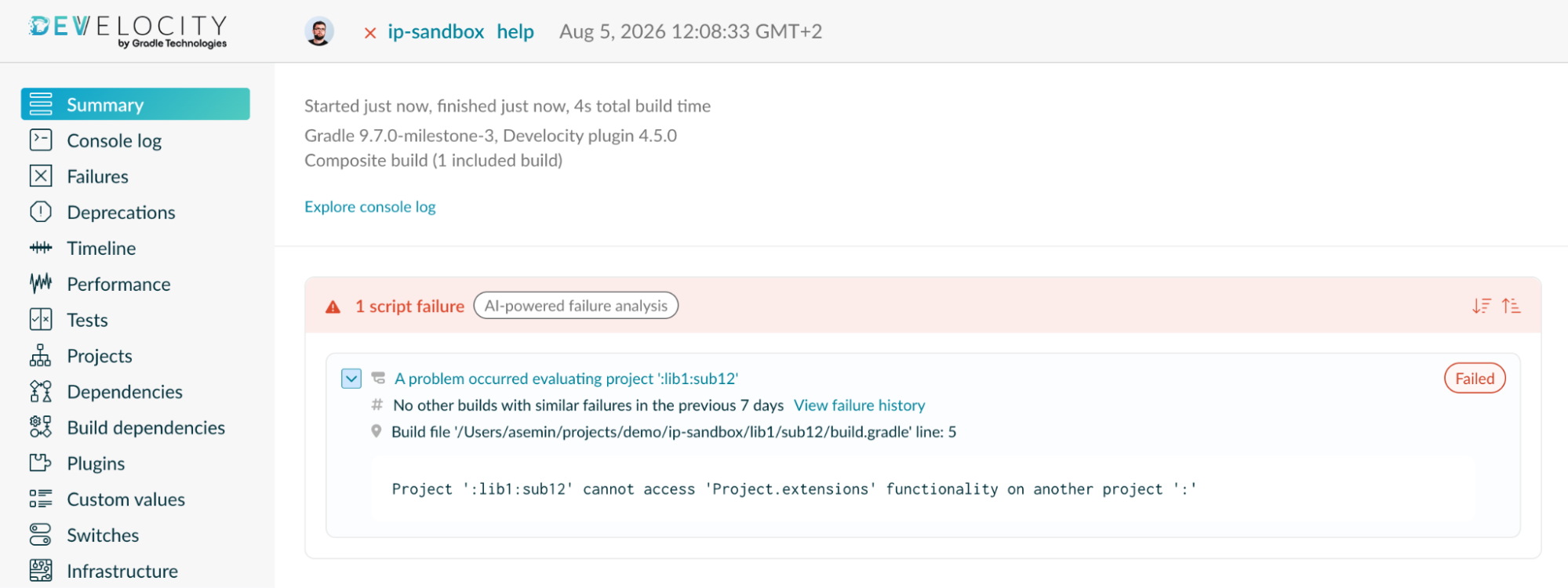
You can use the Diagnostics mode to discover many constraint violations at once. All the reported violations are always available in the familiar Configuration Cache HTML report.
Isolated Projects is now incubating, which means more constraints may be added in the future, including in minor releases.
When migrating your build, you are likely to encounter incompatible community plugins. We encourage you to reach out to their maintainers and ask them to provide Isolated Projects support.
For the most popular Android and Kotlin ecosystems, we collaborated with Google and JetBrains to ensure that their Gradle plugins are compatible. A number of other popular plugins have already adopted Isolated Projects. For example, the popular reference project Now in Android has been made compatible with the help of its maintainers, showing that Isolated Projects doesn’t stand in the way of a modern Android development setup. We thank these teams and community members for their help in making the adoption smoother!
We hope to see many more early adopters of Isolated Projects in the community. Keep in mind that the incubation status means the feature is not yet fully stable. As such, we don’t recommend using it to build production artifacts. Nonetheless, it is already well-suited to local workflows and offers considerable performance benefits.
Performance benefits #
What speedup can you expect for your build after adopting Isolated Projects?
The Isolated Projects user guide section describes the performance implications in detail. In short, the impact of Isolated Projects is highly dependent on build structure, amount and location of build logic, and invocation scenario (CLI vs IDE sync).
One particularly important factor is the degree of parallelism available to the build process. By default, Gradle uses all machine cores, but this can be limited by configuring the number of workers. For the sake of simplicity, we’ll refer to this as just parallelism.
In practice, the best way to determine the real-world performance improvement is to try Isolated Projects in your own build. You can enable the dangerously ignore problems mode to evaluate performance without updating your build to be Isolated Projects compatible.
While the impact of Isolated Projects varies from build to build, we have found its effect on build performance to be substantial. We’ve measured the performance improvements after enabling Isolated Projects for the Gradle build itself and a number of real-world builds from our partners.
In a recent post, we shared the story and the outcomes of adopting Isolated Projects in Gradle’s own build. More than six months ago, the feature became the daily driver of our local development, and we never looked back. The median IDE sync time for our 300-subproject build decreased by about 1.8×, from 84s to 47s. The performance improvement also holds for very long syncs. We measured several minutes of savings per invocation. In benchmarks, a sync after changing build logic went from 2m57s to 1m16s, about 2.3× faster, at a parallelism of 8.
We also work closely with teams adopting Isolated Projects in very large builds, where configuration time can be especially noticeable.
One early adopter runs a 2,500-project pure-Java backend monorepo. With Isolated Projects, a warm IntelliJ IDEA sync went from 3m25s to 2m13s, about 1.5× faster. Configuration with build-script recompilation went from 10m53s to 2m59s, about 3.6× faster. Both measurements were taken at a parallelism of 6.
Another early adopter runs an Android monorepo of more than 5,000 projects. At a parallelism of 32, its total Android Studio sync dropped from 5m09s to 2m44s, about 1.9× faster. The configuration time of a dry run dropped from 3m25s to 2m28s, about 1.4× faster.
AndroidX, a monorepo of more than 1,000 projects, saw similar results at a parallelism of 96. Gradle’s portion of Android Studio sync decreased from 4m00s to 2m47s, about 1.4× faster. The configuration time of a --dry-run went from 3m43s to 2m53s, about 1.3× faster.
Clearly, the benefits of Isolated Projects vary widely, and there is no direct correlation between available parallelism and speedup. However, our testing with real-world projects has shown that Isolated Projects can save minutes of wall-clock time per CLI invocation or IDE sync. This directly translates to improved developer productivity in a number of scenarios.
Current limitations #
While the measurements above show a significant increase in performance when enabling Isolated Projects, it is also apparent that performance gains are not directly correlated to available parallelism.
The performance improvements achieved by the constraints Isolated Projects enforces today represent only a portion of the gains that are possible. While the feature incubates, we intend to continue optimizing Gradle to transparently improve performance. These constraints pave the way for further improvements. Our philosophy is to put features in your hands early: as soon as they can provide a benefit and are practical to adopt. Your builds become faster, and your experience helps us bring the feature to maturity.
In Gradle 9.7.0, task graph discovery notably remains sequential. With Isolated Projects enabled, as projects are configured in parallel, task registration proceeds concurrently. However, the process of discovering the relationships between all tasks that must be executed across projects remains single-threaded. As a result, the current impact of Isolated Projects when running on the CLI may not be as impressive as that observed during IDE sync.
To better understand the trade-offs of the current implementation, see the Limitations section of the Isolated Projects user guide.
Since IDE sync is, in reality, a tight collaboration between Gradle and IDEs, further improvements in sync performance will not be limited solely to those gained by upgrading Gradle versions. We are collaborating with the IntelliJ IDEA and Android Studio teams to ensure the IDEs can exercise the improved concurrency environment that Isolated Projects enables. Be sure to watch out for new IDE releases that further leverage Isolated Projects to improve sync performance. To best adopt the capabilities of Isolated Projects and other performance and usability enhancements, we always recommend staying up to date on the latest tooling versions.
Looking ahead #
We are committed to making Isolated Projects a first-class feature that is easy to adopt and that significantly speeds up your workflows.
While the gains from parallelism are exciting, it is even better not to execute the work in the first place. In future Gradle releases, the constraints that Isolated Projects enforces will make it possible to safely skip configuring projects that are not required for a particular Gradle invocation, such as running a test in a single project. The same constraints also open the door to more fine-grained configuration caching, allowing Gradle to reuse the results of project configuration from previous runs.
At the moment, it is not fully clear whether the existing constraints will be enough to support these optimizations. We are likely to add more as Isolated Projects develops. To remain up to date on further progress, see the Public Roadmap.
In the meantime, we are looking forward to your feedback!
Join the #isolated-projects channel on the Gradle Community Slack, or file an issue in the Gradle repository.