How Gradle Is Javamaxxing

Table of Contents
Introduction
Some people optimize one part of their lives to the absolute limit, then past it. They call it “-maxxing.” Houseplantmaxxing. Sleepmaxxing. Tokenmaxxing.
The Gradle Build Tool is Javamaxxing.
TL;DR #
Breathe easy knowing you can run modern Gradle on JDK 26 while still shipping Java 8-compatible artifacts:
- Gradle aggressively adopts new JDKs because newer JVMs make builds faster, leaner, and easier to maintain.
- Upgrading the JDK that runs Gradle is often the easiest performance win.
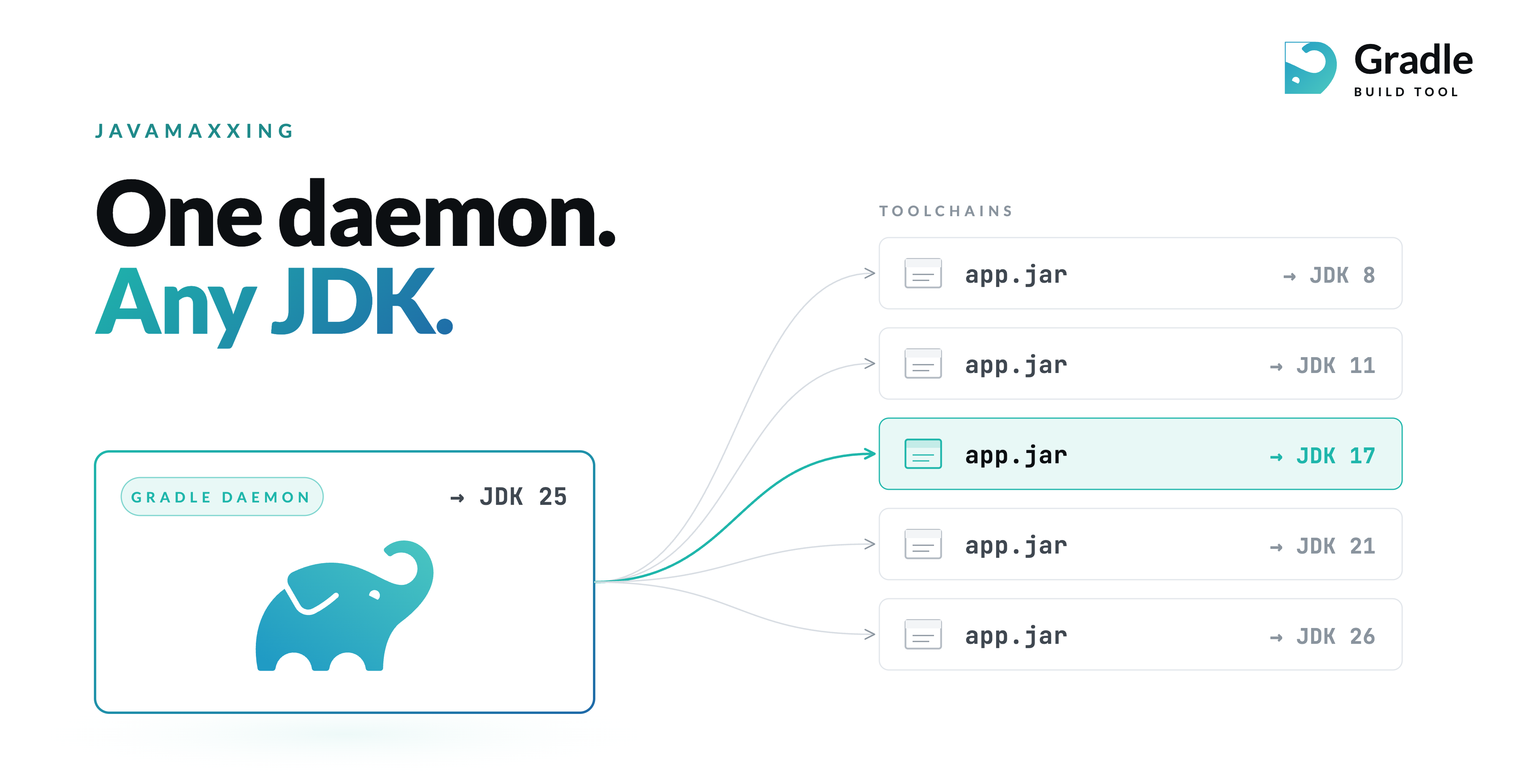
- JVM toolchains fully separate the JVM running Gradle, the JVM compiling your code, and the JVM running your tests.
NOT TL;DR #
We aggressively adopt new JDK releases as soon as we responsibly can.
Not because it’s trendy. Because newer JDKs make Gradle faster, leaner, and easier to maintain. Every OpenJDK release ships improvements to the JVM; garbage collectors, compiler infrastructure, startup behavior, memory layout, and runtime APIs. As a high-performance JVM build tool, Gradle benefits directly from all of it.
The question people immediately ask is:
Does this mean my project also has to run on the newest JDK?
No.
That coupling effectively disappeared once Gradle introduced JVM toolchains. With toolchains, the JVM that runs Gradle is completely separate from the JVM that compiles, tests, and executes your code.
You can run Gradle on JDK 26 today and still produce Java 8 bytecode.
What Is the Current State of Gradle and Java? #
We add daemon support for every new JDK as soon as the ecosystem permits: Java 24 in Gradle 8.14.0, Java 25 in 9.1.0 (released two days after JDK 25 GA), Java 26 in 9.4.0. The full mapping is in the Compatibility Matrix.
We then bump the minimum JVM required to execute Gradle as users move. Gradle 9.0.0, released on July 31, 2025, raised the minimum JVM required to run the Gradle daemon to Java 17. That was the first daemon JVM floor increase since Gradle 5.0 made Java 8 the minimum back in 2018.
The next major transition is already underway, Gradle 10.0.0 will likely require Java 21 to run the daemon.
The timing would match Oracle’s Java SE Support Roadmap, which places the end of Premier Support for JDK 17 in September 2026. By the time Gradle 10 arrives, Java 17 will already be exiting its primary support window.
That’s Javamaxxing.
Why Bother? Because Newer JDKs Make Gradle Faster #
The cheapest, least glamorous, and often most effective Gradle performance optimization is simply upgrading the JDK running Gradle.
Before rewriting custom tasks. Before untangling dependency graphs. Before buying larger CI machines. Just run Gradle on a newer JVM.
You inherit years of JVM engineering work for free. Those improvements generally fall into three categories.
1. Features You Can Explicitly Enable #
Some performance features require opt-in.
A good example is Compact Object Headers (JEP 519).
The feature reduces ordinary object headers from 12 bytes to 8 bytes on 64-bit platforms. According to the JEP benchmarks, this reduced heap usage by roughly 22% and CPU time by about 8% in SPECjbb2015 workloads.
That matters for Gradle. A large Gradle build may keep millions of objects alive simultaneously:
- tasks
- providers
- file snapshots
- dependency graph structures
- configuration model objects
- incremental build state
Saving four bytes per object adds up quickly.
You can experiment with the feature today:
org.gradle.jvmargs=-Xmx2g -XX:MaxMetaspaceSize=512m -XX:+UseCompactObjectHeaders
NOTE: Setting org.gradle.jvmargs replaces Gradle’s defaults rather than appending to them, so preserve any heap or metaspace settings you still want.
2. Features Gradle Can Use Automatically #
Gradle also takes advantage of newer JDK APIs internally.
Gradle ships JDK-version-specific implementations that activate dynamically depending on the JVM the daemon runs on. That lets Gradle use newer platform APIs without requiring all users to upgrade immediately.
Today, this mechanism is still relatively conservative, but it opens the door to deeper integrations over time.
One especially promising example is the Class-File API (JEP 484), finalized in JDK 24.
The API provides a standard JDK-native mechanism for reading and writing Java class files. Historically, most JVM tools depended on ASM for this.
Using a JDK-native API reduces maintenance burden and improves compatibility with new bytecode formats. It also reduces the chances of ecosystem-wide errors like:
“Unsupported class file major version 69”
3. Improvements the JVM Gives Everyone Automatically #
The biggest gains often require no code changes at all.
Every six-month JDK release improves:
- JIT compilation
- garbage collection
- escape analysis
- startup behavior
- memory management
- runtime profiling
- synchronization primitives
You get these improvements simply by changing the JVM version.
Recent releases continue improving both G1 and Parallel GC behavior. JIT compilers continue becoming more aggressive and more efficient. Runtime ergonomics keep improving.
None of this requires rewriting your build. You just run Gradle on a newer JDK. The cumulative effect is substantial:
- lower CI memory pressure
- shorter local feedback loops
- faster configuration and execution
- better scaling for large multi-project builds
How Does Gradle Decide When to Raise the Floor? #
Gradle tracks ecosystem adoption continuously. The decision to move the minimum daemon JVM is based on signals from multiple places:
- Distribution downloads — anonymous JVM info reported by Gradle wrapper distributions.
- IDE & CI — IDEs and CI orchestrators that use Gradle.
- Plugin Portal — what JVMs plugin authors publish for.
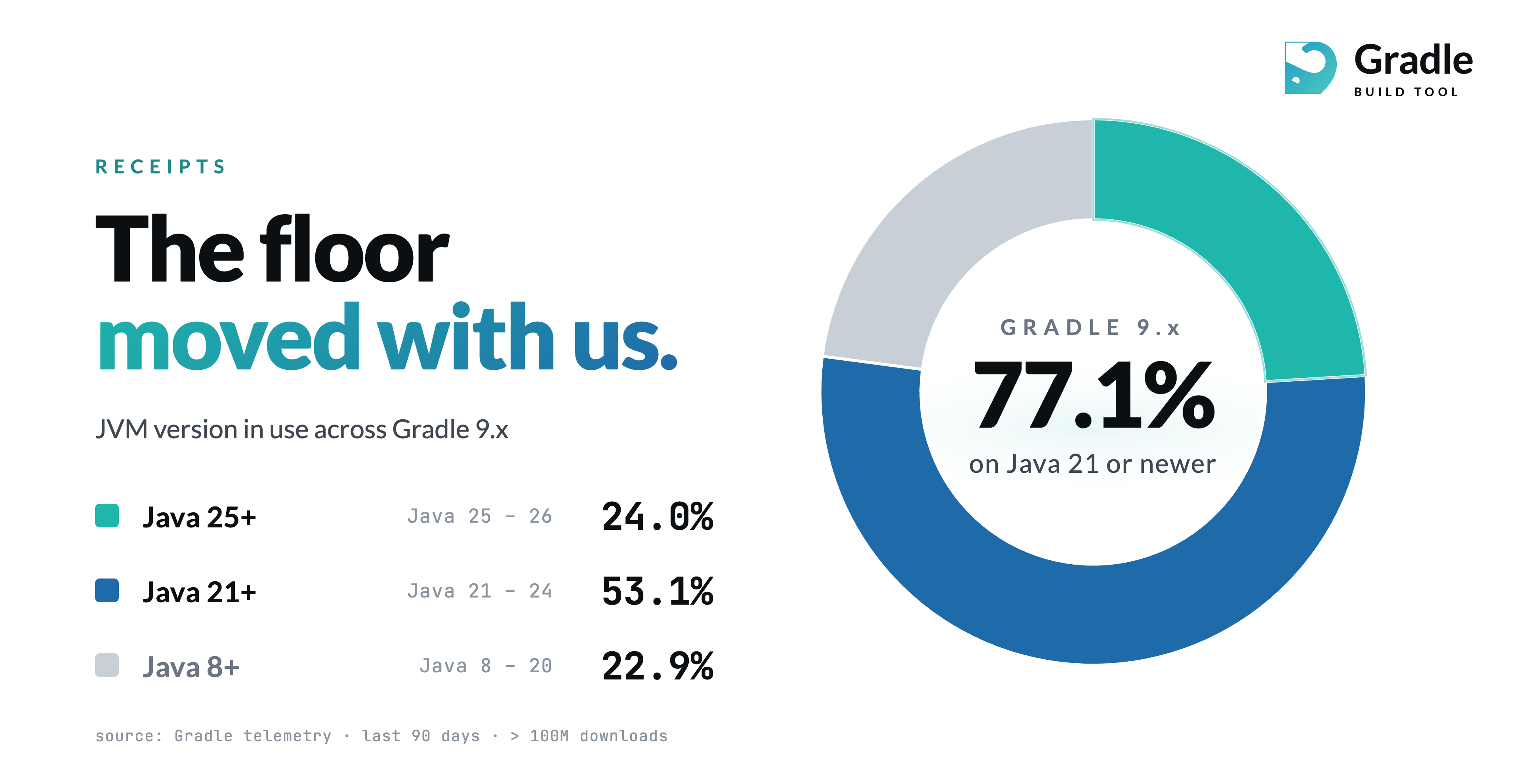
We are currently seeing a trend:
- ~80% of Gradle 9 users are already on Java 21 or higher.
- ~30% of Gradle 9 users are already on Java 25 or higher.
That makes Java 21 a reasonable new floor. But not Java 25.
Gradle tries to move aggressively without stranding users. The project intentionally balances ecosystem progress with ecosystem stability.
“But My Project Still Supports Java 8” #
That is completely fine. This is the most important concept:
The JVM running Gradle is not the JVM your application targets.
You can:
- run Gradle on JDK 25,
- compile Java 8 bytecode,
- run tests on JDK 8,
- and publish artifacts compatible with very old runtimes.
That separation exists because of JVM toolchains.
Here’s a simple example:
java {
    toolchain {
        languageVersion = JavaLanguageVersion.of(8)
    }
}
Gradle will use a Java 8 toolchain for compilation and testing even if the daemon itself runs on a much newer JVM.
If the required JDK is not installed locally, the Foojay Toolchains Resolver Plugin can automatically provision it:
plugins {
    id("org.gradle.toolchains.foojay-resolver-convention") version "1.0.0"
}
What About --release? #
Sometimes you only need older bytecode compatibility, not an older runtime.
In that case, javac --release is often enough.
You can configure it in Gradle like this:
tasks.withType<JavaCompile>().configureEach {
    options.release = 8
}
This instructs javac to:
- emit older bytecode,
- restrict accessible APIs,
- and compile against the appropriate platform definitions.
One caveat: old targets eventually disappear. JEP 182 defines the OpenJDK policy for removing obsolete compilation targets over time. For example:
- Java 12 removed
--release 6 - Java 20 removed
--release 7
Eventually, Java 8 support in --release will disappear too.
But that transition comes from javac evolution, not Gradle itself.
Summary #
Please upgrade Java. We’ll keep doing the same.