The Four Kotlin Versions in a Gradle Project

Table of Contents
Introduction
Do you know what version of Kotlin your Gradle build is using?
There are four Kotlin versions you need to know about in a project built with Gradle. They’re easy to mix up, and mixing them up can lead to some confusion (and the occasional compiler error).
The trick is that there are really only two compilers in play, and each one carries its own language-version dial. Two compilers, two dials, four numbers. Let’s take them one at a time.
This post was updated on June 16, 2026.
1. The Kotlin that compiles your code #
This is the version most people look for. If your application or library code is written in Kotlin and gets compiled by the Kotlin Gradle Plugin, you pick its version in your build:
// build.gradle.kts
plugins {
    kotlin("jvm") version "1.9.25"
}
Change the KGP version, and you change the Kotlin compiler used to compile your project. This is the version you control directly.
2. The Kotlin language version for your code #
Picking the KGP version chooses which compiler runs over your code. But that compiler has a second dial: the language version, which decides what Kotlin syntax it will accept. You set it through KGP:
// build.gradle.kts
kotlin {
    compilerOptions {
        languageVersion = KotlinVersion.KOTLIN_1_8
    }
}
By default it matches the language version associated with your KGP version, so most projects never touch it. You can pin it lower, for example to keep a library compilable by projects still on an older Kotlin. #1 is the compiler; this is the language level you ask that compiler to target.
3. The Kotlin embedded in Gradle (that compiles your build logic) #
Now the other compiler. Gradle ships its own Kotlin compiler and standard library inside the distribution. It’s the compiler that builds your Kotlin DSL scripts and Gradle-managed build logic, and its standard library is available on the classpath used by build scripts and plugins.
You never declare this one. It comes bundled with whatever Gradle version you use. In Gradle 9.6.0:
# gradle/wrapper/gradle-wrapper.properties
distributionUrl=https\://services.gradle.org/distributions/gradle-9.6.0-bin.zip
The embedded Kotlin version is 2.3.21, declared in Gradle’s own version catalog:
# distribution.versions.toml
[versions]
kotlin = "2.3.21!!"

[libraries]
kotlinStdlib = { group = "org.jetbrains.kotlin", name = "kotlin-stdlib", version.ref = "kotlin" }
If you want to check the version, run:
./gradlew -version

------------------------------------------------------------
Gradle 9.6.0
------------------------------------------------------------

Kotlin:        2.3.21
4. The Kotlin language version for your build logic #
The embedded compiler has the very same dial as KGP, a language version that decides which syntax it accepts. The difference: for your build logic, you don’t get to turn it. Gradle pins it.
Since that language version is tied to your Gradle version, the same build logic can compile on one Gradle release and fail on another.
Say you’re on Gradle 8.10, which targets language version 1.8, and you reach for a data object (added in Kotlin 1.9) in a build script:
// build.gradle.kts on Gradle 8.10, language version 1.8
sealed interface Stage
data object Build : Stage   // won't compile: 'data object' needs language version 1.9+
data object Test : Stage
It won’t compile.
Upgrade the wrapper to Gradle 9.0.0, which targets language version 2.2, and the exact same code now works:
// build.gradle.kts on Gradle 9.0.0, language version 2.2
sealed interface Stage
data object Build : Stage   // 'data object' is available
data object Test : Stage
The build-logic language version is usually older than the embedded compiler, and that’s deliberate. Pinning the language version is Gradle’s documented backward-compatibility policy: backward-incompatible Kotlin upgrades only happen at major Gradle releases.
That’s why the script language version held at 1.8 through the entire Gradle 8.x line and only moved to 2.2 at Gradle 9.0.0.
It keeps existing build scripts and plugins compiling even as the embedded compiler underneath them gets updated.
And this works safely because Kotlin builds for it.
The compiler’s -language-version and -api-version flags officially support at least the three previous language and API versions alongside the latest stable one, so a 2.3.21 compiler holding your scripts to 2.2 is squarely inside Kotlin’s own supported window.
If you can’t remember which language version is used, you can consult the Kotlin compatibility section of the Gradle User Manual:
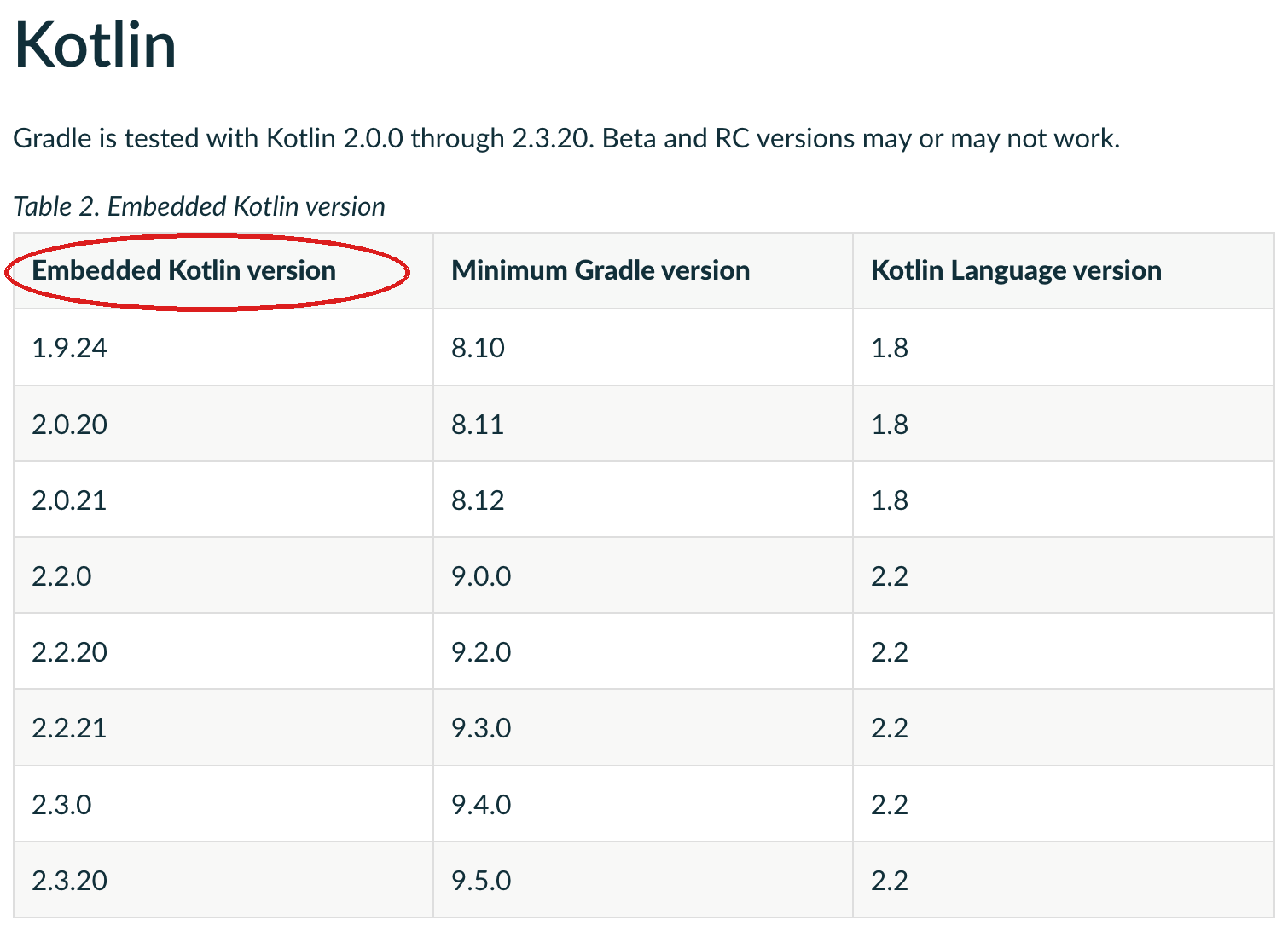
Let’s recap #
So that’s four version numbers, but only two actual compilers, and each compiler carries a language-version dial.
#1 and #2 belong to your code. #1 is the Kotlin Gradle Plugin, which configures and invokes the Kotlin compiler that builds your application code. #2 is the language version you tell that compiler to target. Both are yours to set, in your build.
#3 and #4 belong to your build. #3 is the embedded Kotlin that Gradle bundles to compile your build logic. #4 is the language version it targets, which Gradle pins. Both come bundled with your Gradle version.
It’s the same shape on each side: a compiler, plus a dial telling it which Kotlin syntax to accept.
Put it together and on Gradle 9.6.0:
plugins {
    kotlin("jvm") version "1.9.25"
}

kotlin {
    compilerOptions {
        languageVersion = KotlinVersion.KOTLIN_1_8
    }
}
Here, your build logic is compiled by the embedded 2.3.21 compiler at language level 2.2, while your application code is compiled by the Kotlin 1.9.25 compiler operating at language level 1.8.
| # | Version | What it does | What sets it |
|---|---|---|---|
| 1 | Kotlin Gradle Plugin | Configures the Kotlin compiler used for your application code | Your build logic |
| 2 | Language version (your code) | The syntax level #1 targets for your code | Your build logic |
| 3 | Embedded Kotlin | The compiler and runtime Gradle bundles for build logic | Your Gradle version |
| 4 | Language version (build logic) | The syntax level #3 targets for your build logic | Your Gradle version |
The catch #
The version you pick in plugins { ... } controls how your application code is compiled.
But anything that runs inside the build executes on Gradle’s runtime, right alongside the embedded Kotlin.
That includes your buildSrc, precompiled script plugins, and the Kotlin Gradle Plugin itself, all of which interact with Gradle’s embedded Kotlin runtime.
That shared runtime means the Kotlin your build logic uses can’t drift too far from the version Gradle embeds.
If you let them drift too far apart, things start to break.
The classic symptom is a warning about multiple versions of Kotlin on the classpath, which shows up when buildSrc or a plugin pulls in a Kotlin far from the embedded one.
(The Kotlin Gradle Plugin didn’t respect Gradle’s runtime cleanly until version 1.5.10; see KT-41142.)
There aren’t hard numbers for “too far,” because it depends on which parts of the Kotlin standard library your build logic actually touches, and that compatibility boundary is owned by the Kotlin team, not Gradle.
So the practical rule is this: your application’s Kotlin version can move on its own, but the Kotlin you use in your build logic should stay close to whatever your Gradle version embeds.
For the background on how Kotlin manages this compatibility, see the Kotlin evolution principles.
For a wider tour of the friction this causes, see @eskatos’s issue on mixing Kotlin versions in Gradle builds.
When you upgrade #
Bumping Gradle is rarely just bumping Gradle. A new wrapper version usually moves more than one of these at once, and each can ask something of you:
-
Your build logic may need touch-ups for the new Kotlin language version, since newly unsupported language constructs or deprecated APIs in build logic can stop compiling.
-
Your Kotlin Gradle Plugin (KGP) version likely needs a bump too, if your project applies the Kotlin plugin. KGP is only tested and officially supported against specific Gradle versions, so bumping Gradle usually means bumping KGP.
-
Your Kotlin source code can be affected as well, because bumping KGP pulls in a newer Kotlin compiler, and that newer compiler can surface fresh deprecations (or even compilation errors) in your actual application code.